
Better NYTC Chrome 插件, crx 扩展下载
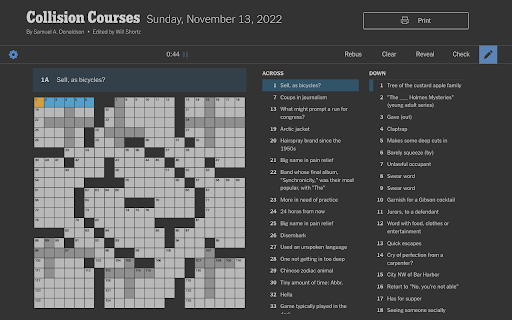
Better keyboard control, a dark mode, and more for the NY Times Crossword.
* Hold shift to use pencil temporarily, double tap to…
Better keyboard control, a dark mode, and more for the NY Times Crossword.
* Hold shift to use pencil temporarily, double tap to switch.
- Alternatively, you can use Caps Lock to switch (activate from control panel).
* Use shortcut Alt-P (Option-P) to pause/unpause the timer.
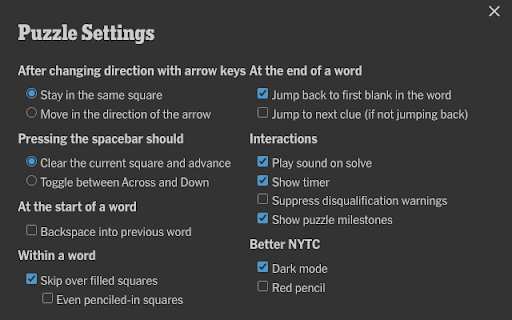
* Activate dark mode from the puzzle's control panel (gear icon). Preserves yellow and blue highlights, and keeps shaded squares visible, while saving your eyes.
* Activate red pencil from the control panel, to make pencil stand out.
| 分类 | ♿无障碍访问 |
| 插件标识 | alnkedkadmkfjecjinjbkkjpkbhldldk |
| 平台 | Chrome |
| 评分 |
☆☆☆☆☆
0
|
| 评分人数 | 2 |
| 插件主页 | https://chromewebstore.google.com/detail/better-nytc/alnkedkadmkfjecjinjbkkjpkbhldldk |
| 版本号 | 1.3 |
| 大小 | 6.86KiB |
| 官网下载次数 | 84 |
| 下载地址 | |
| 更新时间 | 2023-03-05 00:00:00 |
CRX扩展文件安装方法
第1步: 打开Chrome浏览器的扩展程序
第2步:
在地址栏输入: chrome://extensions/
第3步: 开启右上角的【开发者模式】
第4步: 重启Chrome浏览器 (重要操作)
第5步: 重新打开扩展程序管理界面
第6步: 将下载的crx文件直接拖入页面完成安装
注意:请确保使用最新版本的Chrome浏览器
同类插件推荐

NY Times Games Dark Mode
Dark Mode for NY Times Games like Crossword, Wordl
Better NYTC
Better keyboard control, a dark mode, and more for

NYT Crossword Pencil Toggle
On the New York Times' Crossword site, press t

NYT Crossword Clue Hider
Hide clues you have already filled on the New York

NYT Crossword Fullscreen
Adds a fullscreen button to the NYT crossword UI.A
NYT Crossword Dark Mode
Adds a dark mode to the New York Times Crossword p

Color Generator
Generate a Color PaletteGenerate Colour Scheme , P
Chat Fusion
The extension collects the authors of identical po

GPT AI-Powered Email Assistant for Businesses
Don't spend all day answering the same custome

Fast Crypto Monitor
Real Time monitoring of Cryptocurrencies directly

Bearworks
Bearworks enables people to sell together, anywher

Whispy Companion
Companion extension for Whispy.org.This extension

Gympass ScreenSaver
Gympass, the ultimate chrome extension that keeps