
codereview.gpt Chrome 插件, crx 扩展下载
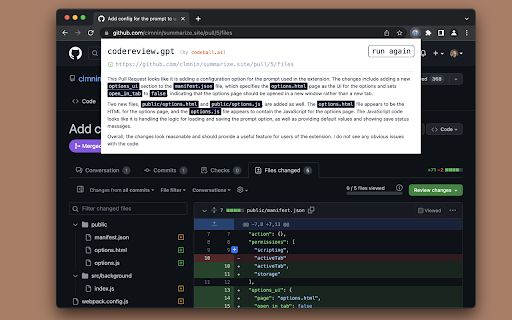

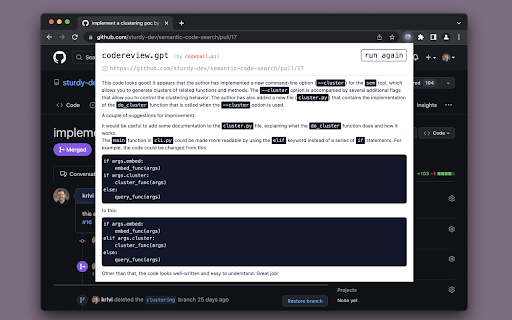
Reviews your Pull Requests using ChatGPT so that you can pretend to work
Review GitHub Pull Requests or GitLab Merge Requests using ChatGPT.
Introducing codereview.gpt — your AI code reviewer. This extension allows you to get feedback on any Pull Request and possibly catch bugs you didn't see.
How does it work? Navigate to a specific PR and click the extension icon — you will then get review comments in the pop-up window (see screenshots).
FAQ
Q: Are the reviews 100% trustworthy?
A: Nope, as of 2022. This tool can help you spot bugs, but as with anything, use your judgement.
Q: What aspects of the Pull Request are considered during the review?
A: The model gets the code changes, the PR title and description, as well as a list of the files and folders in the root of the project.
Q: Does the extension leave any comments on the Pull Request?
A: No. If you want any of the feedback as PR comments, you can just copy paste the output.
Q: Why do you want this?
A: Plenty of reasons! You can:
- Pretend to work while playing games instead
- Appear smart to your colleagues
- Enable a future Skynet
- Actually catch some bugs you missed
This extension is free and open source — https://github.com/sturdy-dev/codereview.gpt
| 分类 | 💻开发者工具 |
| 插件标识 | amdfidcajdihmbhmmgohhkoaijpkocdn |
| 平台 | Chrome |
| 评分 |
★★★★☆
4.6
|
| 评分人数 | 173 |
| 插件主页 | https://chromewebstore.google.com/detail/codereviewgpt/amdfidcajdihmbhmmgohhkoaijpkocdn |
| 版本号 | 0.3.0 |
| 大小 | 1.29MiB |
| 官网下载次数 | 926 |
| 下载地址 | |
| 更新时间 | 2023-06-08 00:00:00 |
CRX扩展文件安装方法
第1步: 打开Chrome浏览器的扩展程序
第2步:
在地址栏输入: chrome://extensions/
第3步: 开启右上角的【开发者模式】
第4步: 重启Chrome浏览器 (重要操作)
第5步: 重新打开扩展程序管理界面
第6步: 将下载的crx文件直接拖入页面完成安装
注意:请确保使用最新版本的Chrome浏览器
同类插件推荐

codereview.gpt
Reviews your Pull Requests using ChatGPT so that y

ChatGPT Shortcut
让生产力加倍的 ChatGPT 快捷指令? 请右键单击扩展图标,并选择「选项」以设定您偏好的语言和显

GMPlus - OpenAI ChatGPT For Email: ChatGPT 中文
Display ChatGPT response as a suggestion to comple

ChatGPT for Google
Display ChatGPT response alongside search engine r