
Tube Shot : YouTube摘要、脚本撰写、关键见解与ChatGPT、Claude、Gemini、Perplexity Chrome 插件, crx 扩展下载
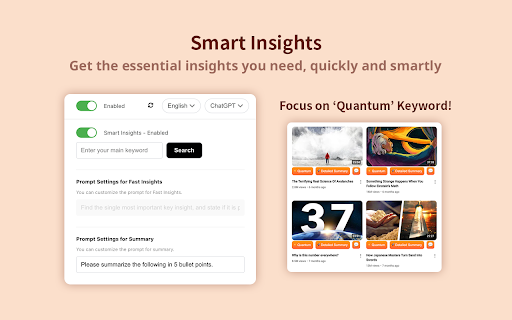
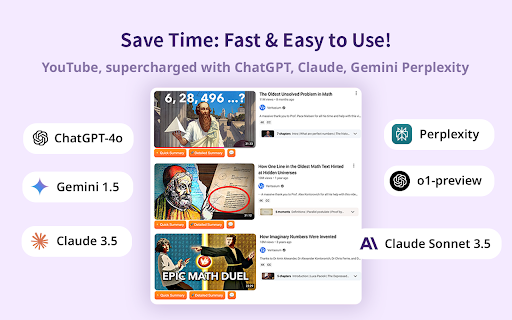
使用AI快速获取YouTube视频摘要,脚本和关键见解。一键生成简明内容,由ChatGPT、Claude、Gemini和Perplexity提供支持。
YouTube Summary with ChatGPT & Claude is a free Chrome Extension that quickly summarizes YouTube videos. Powered by ChatGPT (OpenAI) and Claude (Anthropic), this tool saves time, boosts productivity, and enhances learning by providing concise summaries of lengthy videos.
Key Benefits
Save Time: Quickly grasp main points without watching lengthy videos.
Boost Productivity: Absorb key information efficiently, allowing focus on other tasks.
Enhanced Learning: Summaries and transcripts aid in studying and content retention.
How to Use
After installing the extension, open any YouTube video you want summarized and click the YouTube Summary icon in your browser.
Fast Summarization Feature
Quick Summary with the "Fast" Button: By selecting the "Fast" button, you can access an ultra-condensed version of the video, pinpointing the core insights in just a few sentences. This option is ideal for those moments when you need the main takeaway quickly.
Customization and Language Support
Customize Summary Length: Tailor the summary detail level to your needs in settings.
Language Options: Generate summaries in multiple languages, making the tool accessible globally.
| 分类 | 📝工作流程与规划 |
| 插件标识 | amjhmopmfgkpalpgklgbjajnmcbfagjc |
| 平台 | Chrome |
| 评分 |
★★★★☆
4.3
|
| 评分人数 | 2156 |
| 插件主页 | https://chromewebstore.google.com/detail/tube-shot-youtube摘要、脚本撰写、/amjhmopmfgkpalpgklgbjajnmcbfagjc |
| 版本号 | 16.0 |
| 大小 | 175KiB |
| 官网下载次数 | 1000 |
| 下载地址 | |
| 更新时间 | 2025-01-04 00:00:00 |
CRX扩展文件安装方法
第1步: 打开Chrome浏览器的扩展程序
第2步:
在地址栏输入: chrome://extensions/
第3步: 开启右上角的【开发者模式】
第4步: 重启Chrome浏览器 (重要操作)
第5步: 重新打开扩展程序管理界面
第6步: 将下载的crx文件直接拖入页面完成安装
注意:请确保使用最新版本的Chrome浏览器
同类插件推荐

Shortform: Summary of Web + YouTube / ChatGPT
Summarize anything on the web and YouTube in one c
Tube Shot : YouTube摘要、脚本撰写、关键见解与ChatGPT、Claude、Gemini、Perplexity
使用AI快速获取YouTube视频摘要,脚本和关键见解。一键生成简明内容,由ChatGPT、Clau

Youtube Summary With ChatGPT
通过阅读您正在观看的视频的摘要来节省时间。支持 ChatGPT、Gemini 和 Claude AI

TubeSum: ChatGPT AI驱动的YouTube视频摘要
用AI摘要简化YouTube观看体验。获取洞察力,导航时间戳,多语言支持,借助ChatGPT。探索T