
Auto History Wipe Chrome 插件, crx 扩展下载
自动历史记录清除:自动清理浏览历史记录、缓存和Cookie。带有计划选项的自动历史记录清除。
? Auto History Wipe: Your Privacy, Automated
Easily manage and Auto History Wipe clean your browsing data with customizable schedules and options.
Auto History Wipe Key Features:
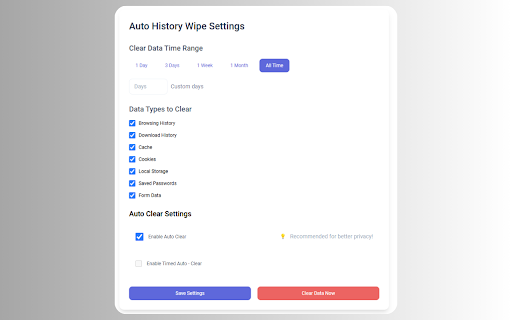
✨ One-Click Cleaning: Clear your browsing data instantly with a single click
⏰ Scheduled Cleaning: Set automatic cleaning intervals
? Selective Cleaning: Choose what to clean:
• Auto History Cleaner delete history
• Clear Download History
• Auto History Cleaner delete cache
• Clear Cookies
• Clear Local Storage
• Clear Saved Passwords
• Clear Form Data
⚙️ Flexible Time Options:
• Clean data from last day
• Clean data from last 3 days
• Clean data from last week
• Clean data from last month
• Clean all time
• Custom time range
?️ Privacy Features:
• Auto-clear when browser starts
• Scheduled automatic clearing
• Custom cleaning intervals
• Visual cleaning confirmation
Auto History Wipe Perfect for:
- Privacy-conscious users
- Shared computer users
- Regular privacy maintenance
- Automated browsing data management
Auto History Wipe Simple, lightweight, and privacy-focused!
| 分类 | 💻开发者工具 |
| 插件标识 | amndpakmdficmebaknminpdbgdccfkjn |
| 平台 | Chrome |
| 评分 |
★★★★☆
4.2
|
| 评分人数 | 32 |
| 插件主页 | https://chromewebstore.google.com/detail/auto-history-wipe/amndpakmdficmebaknminpdbgdccfkjn |
| 版本号 | 0.0.7 |
| 大小 | 242KiB |
| 官网下载次数 | 1000 |
| 下载地址 | |
| 更新时间 | 2024-12-04 00:00:00 |
CRX扩展文件安装方法
第1步: 打开Chrome浏览器的扩展程序
第2步:
在地址栏输入: chrome://extensions/
第3步: 开启右上角的【开发者模式】
第4步: 重启Chrome浏览器 (重要操作)
第5步: 重新打开扩展程序管理界面
第6步: 将下载的crx文件直接拖入页面完成安装
注意:请确保使用最新版本的Chrome浏览器
同类插件推荐
Auto History Wipe
自动历史记录清除:自动清理浏览历史记录、缓存和Cookie。带有计划选项的自动历史记录清除。? Au

Clear Cache & History Cleaner
自动历史记录擦除 - 自动历史记录清理器在关闭或启动 chrome 时删除缓存使用此插件,您可以在打

Cleaner - history & cache clean
Best way to clean cache and chrome browsing data!

自动刷新页面
标签页自动刷新。自动刷新页面。使用固定或随机的指定时间间隔进行自动刷新和页面监控。最后,一个可以正常