
Meet Attendance Tracker Chrome 插件, crx 扩展下载
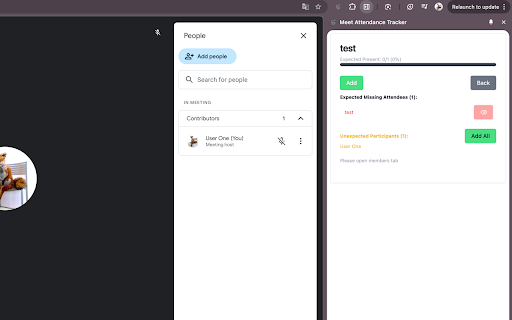
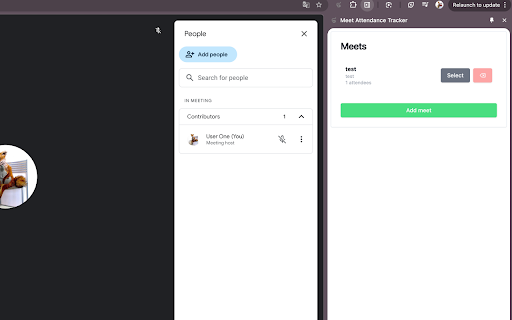
Automatically track and save Google Meet participants in a convenient side panel. Never lose track of who attended your meetings!
# Meet Attendance Tracker
Track and manage attendance in your Google Meet sessions automatically. Perfect for teachers, team leads, and event organizers who need to monitor meeting participation.
## Key Features
✨ Automatic Attendance Tracking
• Automatically detects and tracks meeting participants
• Real-time monitoring of who joins and leaves
• Clear visual indicators for present and absent attendees
• Tracks unexpected participants
? Meeting Management
• Create and save multiple meeting configurations
• Auto-detection of meeting rooms
• Easy meeting selection and switching
• Organized meeting history
? Attendee Management
• Maintain expected attendee lists for each meeting
• Add attendees manually or in bulk
• Import/Export attendee lists
• Track attendance percentages
? Smart Features
• Automatic meeting detection
• Real-time attendance updates
• Easy-to-read attendance statistics
• Semi-transparent interface that won't block your view
? Perfect For
• Teachers tracking class attendance
• Team leads monitoring stand-ups
• Event organizers managing participants
• Anyone who needs to track meeting attendance
## How It Works
1. Create or join a Google Meet session
2. The extension automatically detects the meeting
3. Add your expected attendees list
4. Watch as the extension tracks attendance in real-time
## Privacy & Security
• Works entirely within your browser
• No data sent to external servers
• All data stored locally in your browser
• No login required
## Free Features
• Unlimited meetings
• Unlimited attendee tracking
• Full attendee management
• Real-time monitoring
• Import/Export capabilities
Get organized and stop manually tracking attendance - let Meet Attendance Tracker do the work for you!
Note: This extension is not affiliated with Google Meet. It is an independent tool designed to enhance your Google Meet experience.
| 分类 | 🛠️工具 |
| 插件标识 | ancilbhofgcjpannofklmlinnniceedd |
| 平台 | Chrome |
| 评分 |
★★★★☆
4.7
|
| 评分人数 | 2026 |
| 插件主页 | https://chromewebstore.google.com/detail/meet-attendance-tracker/ancilbhofgcjpannofklmlinnniceedd |
| 版本号 | 0.0.5 |
| 大小 | 74.58KiB |
| 官网下载次数 | 30 |
| 下载地址 | |
| 更新时间 | 2024-12-18 00:00:00 |
CRX扩展文件安装方法
第1步: 打开Chrome浏览器的扩展程序
第2步:
在地址栏输入: chrome://extensions/
第3步: 开启右上角的【开发者模式】
第4步: 重启Chrome浏览器 (重要操作)
第5步: 重新打开扩展程序管理界面
第6步: 将下载的crx文件直接拖入页面完成安装
注意:请确保使用最新版本的Chrome浏览器
同类插件推荐
Meet Attendance Tracker
Automatically track and save Google Meet participa

Meeting Timer - for Google Meet
Display a Timer on Google Meet calls based on your

Google 实时转录与摘要
meetXcc:即时总结 Google Meet 文字记录。您的 AI 会议助手。用AI助手为您的会

Checker Plus for Google Calendar™
从扩展图标中就能获悉之后的会议安排和今天的日期信息;通过桌面通知获得活动提醒;不需打开Google日