
JSON-LD Tester Chrome 插件, crx 扩展下载
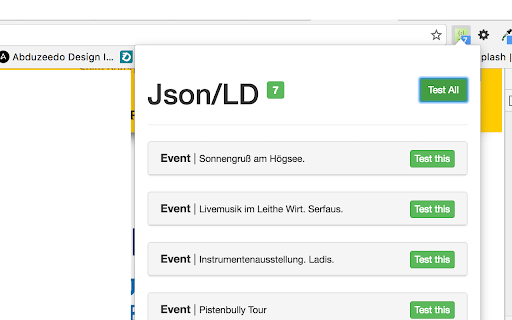
JSON LD Test and Viewer
1.0.14:
- Multi Language Support
- ch/en/de/es
1.0.13:
- Bugfix a message Error
1.0.12:
- Bugfix with Darkmode
1.0.10:
- add Darkmode
- fix bug with with wrong link when click "Test all"
1.0.9:
- change link to test single snippets
1.0.8:
- remove "alarms" and "tabs" from permissions
- add Manifest v3
1.0.6:
- Json Test is now the Rich-Test's from Google
1.0.5:
- small Bugfix for css.
1.0.4:
- Update for small Bugfixes
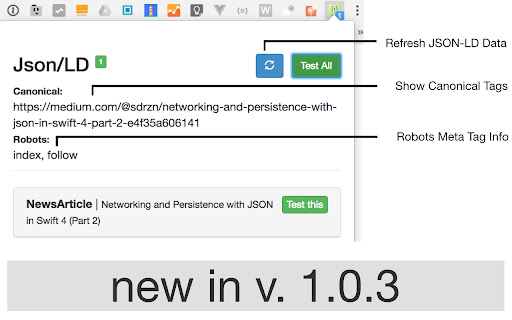
1.0.3:
- Refresh Button (do not need to refresh the site only in popup) / Seite nochmal durchsuchen über den Refresh Button
- Show Canonical / Der Canonical wir angezeigt wenn vorhanden
- Show Robots / Zeigt die Robots content an wenn vorhanden
- Remove <script> Tags for Validation on Google Page
Validate and Show the JSON-LD data from the current tab.
Dieses Tool zeigt die Anzahl der JSON-LD Daten auf einer Website an.
Im Popup Menü gibt es die Möglichkeit die Daten zu Validieren.
| 分类 | 💻开发者工具 |
| 插件标识 | aohmciehgjboidolkmoaofcbnejmokan |
| 平台 | Chrome |
| 评分 |
★★★★☆
4.9
|
| 评分人数 | 56 |
| 插件主页 | https://chromewebstore.google.com/detail/json-ld-tester/aohmciehgjboidolkmoaofcbnejmokan |
| 版本号 | 1.0.14 |
| 大小 | 390KiB |
| 官网下载次数 | 5000 |
| 下载地址 | |
| 更新时间 | 2024-07-23 00:00:00 |
CRX扩展文件安装方法
第1步: 打开Chrome浏览器的扩展程序
第2步:
在地址栏输入: chrome://extensions/
第3步: 开启右上角的【开发者模式】
第4步: 重启Chrome浏览器 (重要操作)
第5步: 重新打开扩展程序管理界面
第6步: 将下载的crx文件直接拖入页面完成安装
注意:请确保使用最新版本的Chrome浏览器
同类插件推荐
JsonDiscovery
Browser extension that changes the way you're

Virtual Json Viewer
JSON browser extension with virtual DOM, search an

JSON-LD Tester
JSON LD Test and Viewer1.0.14: - Multi Language Su
JSON Formatter
Automatic URL Encoder, Decoder tool with JSON Form