
ChatGPT Xtra Chrome 插件, crx 扩展下载
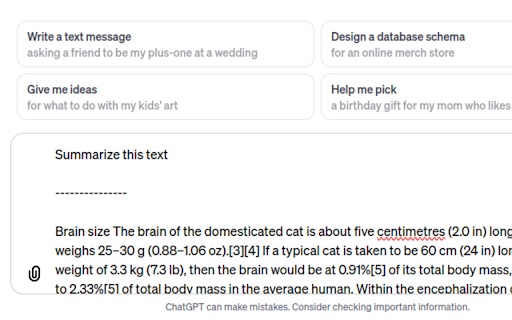
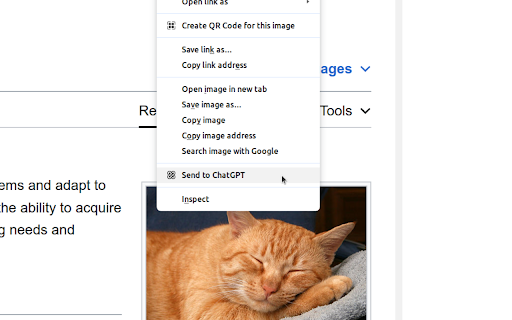
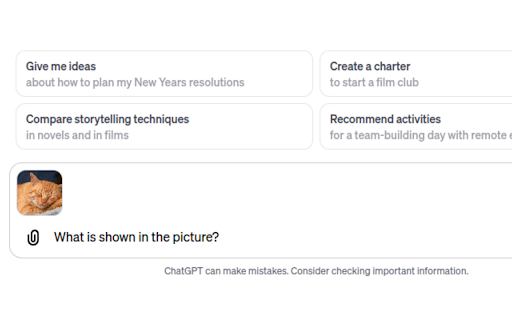
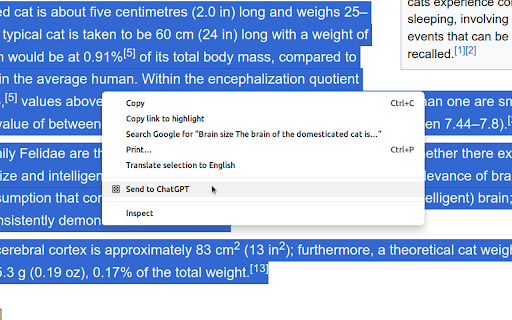
This extension enhances ChatGPT user experience by adding interactive and efficient features for better ChatGPT use.
"ChatGPT Xtra" is a Chrome extension designed to enhance the user experience on chat.openai.com by integrating convenient features for a more interactive and efficient conversation with ChatGPT. Key features include
Image attachment from web pages: This feature allows users to seamlessly attach images directly from any web page to new chat. By simply right-clicking on an image and selecting from the context menu.
Prompt combination with selected text: This feature allows users to combine their own typed prompt with text selected from any web page. When browsing online, users can highlight text, right click to access the context menu and choose to send that text along with their prompt to ChatGPT.
Overall, "ChatGPT Xtra" enhances the functionality of chat.openai.com by making it more user-friendly and versatile, especially for those who frequently reference external content or wish to incorporate multimedia elements into their conversations with ChatGPT.
| 分类 | 🛠️工具 |
| 插件标识 | baagbnbocpdlgifpillkgicofdgamajp |
| 平台 | Chrome |
| 评分 |
★★★★☆
4.3
|
| 评分人数 | 10 |
| 插件主页 | https://chromewebstore.google.com/detail/chatgpt-xtra/baagbnbocpdlgifpillkgicofdgamajp |
| 版本号 | 1.0.4 |
| 大小 | 72.15KiB |
| 官网下载次数 | 54 |
| 下载地址 | |
| 更新时间 | 2024-12-06 00:00:00 |
CRX扩展文件安装方法
第1步: 打开Chrome浏览器的扩展程序
第2步:
在地址栏输入: chrome://extensions/
第3步: 开启右上角的【开发者模式】
第4步: 重启Chrome浏览器 (重要操作)
第5步: 重新打开扩展程序管理界面
第6步: 将下载的crx文件直接拖入页面完成安装
注意:请确保使用最新版本的Chrome浏览器
同类插件推荐
ChatGPT Xtra
This extension enhances ChatGPT user experience by

ChatGPT Extension for a Better UI - Theme Editor with Power-Ups
使用此 ChatGPT 扩展来定制你的 ChatGPT 界面,打造更好的界面体验和增强功能。同时适用

ChatGPT Keyboard Shortcuts
Enhance your ChatGPT experience with easy-to-use k

PowerPal for ChatGPT
A Chrome extension to enhance the ChatGPT experien