
3CX Click2Call Chrome 插件, crx 扩展下载
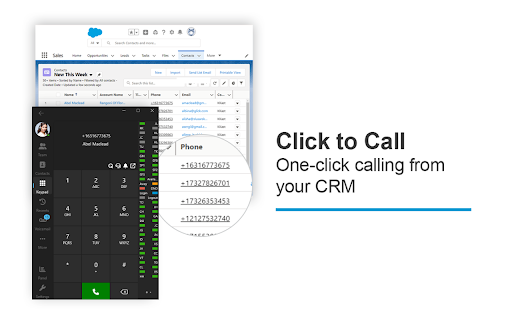
The 3CX browser extension provides click2call from any website or CRM system for 3CX PBX users.
The 3CX browser extension provides click2call from any website or CRM system for 3CX PBX users.
With the 3CX extension, Click2Call functionality enables telephone numbers on any webpage or CRM system to be ‘hyperlinked’ allowing a simple click to initiate the call instead of copying and pasting. When setting up the extension, the extension options include the choice for the number to be passed to the 3CX Web Client or 3CX Softphone for Windows. Additionally, included within the settings is an ‘Exclusion list’ where you can set specific URLs in which you do not want the numbers to be ‘hyperlinked’.
Important: This extension is only for use with 3CX V20, and is not a standalone extension.
| 分类 | 👥社交 |
| 插件标识 | baipgmmeifmofkcilhccccoipmjccehn |
| 平台 | Chrome |
| 评分 |
★★★★☆
4.4
|
| 评分人数 | 7121 |
| 插件主页 | https://chromewebstore.google.com/detail/3cx-click2call/baipgmmeifmofkcilhccccoipmjccehn |
| 版本号 | 5.0.0.171 |
| 大小 | 251KiB |
| 官网下载次数 | 200000 |
| 下载地址 | |
| 更新时间 | 2024-07-30 00:00:00 |
CRX扩展文件安装方法
第1步: 打开Chrome浏览器的扩展程序
第2步:
在地址栏输入: chrome://extensions/
第3步: 开启右上角的【开发者模式】
第4步: 重启Chrome浏览器 (重要操作)
第5步: 重新打开扩展程序管理界面
第6步: 将下载的crx文件直接拖入页面完成安装
注意:请确保使用最新版本的Chrome浏览器
同类插件推荐

3CX Webclient auto dial
Clicks the dial button in 3CX WebclientClicks the

Jabra ChromeHost (Chrome Extension)
Enables device integration in compatible web appli

Hudu Chrome Extension
Hudu Chrome ExtensionGet the most out of your Hudu

Zoiper Click2Dial
Make phone numbers clickable and initiate calls fr

3CX Click2Call
The 3CX browser extension provides click2call from

N-able Passportal
N-able PassportalYou can save all your usernames a

SIP Phone
SIP Phone is a WebRTC client.SIP Phone works using

Asterisk Click2Call
Calls a phone number highlighted on a web page usi

SIP Click To Call Phone Extension
It is provide click to call from any web page in b
Click-to-Call for Web and CRM
Click to Call dialing from web pages, integration

Click To Call Chrome Extension
This chrome extension use for click to call any nu
Bitwarden 密码管理器
无论是在家中、工作中还是在旅途中,Bitwarden 都可以轻松地保护您的所有密码、通行密钥和敏感信

Keeper® Password Manager & Digital Vault
Generate strong passwords, autofill and protect yo