
Fatebook for Chrome Chrome 插件, crx 扩展下载

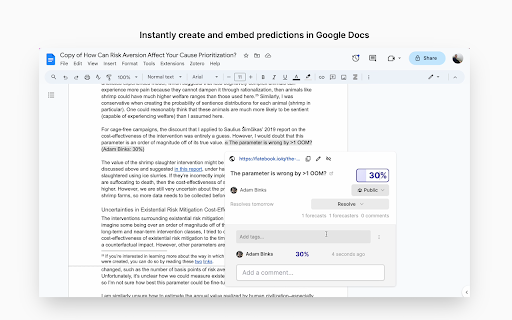
The fastest way to make and track predictions
Rapidly record a prediction on any webpage by pressing Ctrl-Shift-F.
Then you can paste an embed of your prediction, right into the webpage (e.g. a Google Doc, Notion document, Asana item, or tweet).
This extension also transforms links to Fatebook predictions into interactive embeds - anywhere on the web. Everyone reading can add their own predictions, add comments, and get notified when the question resolves as YES, NO or AMBIGUOUS.
| 分类 | 📝工作流程与规划 |
| 插件标识 | bbmkpfopjckjieficoddmcjmlkggillm |
| 平台 | Chrome |
| 评分 |
★★★★☆
4.8
|
| 评分人数 | 68 |
| 插件主页 | https://chromewebstore.google.com/detail/fatebook-for-chrome/bbmkpfopjckjieficoddmcjmlkggillm |
| 版本号 | 1.0.3 |
| 大小 | 120KiB |
| 官网下载次数 | 270 |
| 下载地址 | |
| 更新时间 | 2024-02-13 00:00:00 |
CRX扩展文件安装方法
第1步: 打开Chrome浏览器的扩展程序
第2步:
在地址栏输入: chrome://extensions/
第3步: 开启右上角的【开发者模式】
第4步: 重启Chrome浏览器 (重要操作)
第5步: 重新打开扩展程序管理界面
第6步: 将下载的crx文件直接拖入页面完成安装
注意:请确保使用最新版本的Chrome浏览器
同类插件推荐

FoxVox
A small web extension to have fun with your friend
Fatebook for Chrome
The fastest way to make and track predictionsRapid

Calibrate
Chrome extension that hides numbers on web pages s

ACX Tweaks
Quality of life improvements for the Astral Codex

Manifolio
Bet size calculator for Manifold MarketsBet size c

LeechBlock NG
LeechBlock is a simple productivity tool for block

ActivityWatch Web Watcher
Log the current tab and your browser activity with

Delayed Gratification
A quick and easy cure for Endless Scrolling Syndro

Ampie
Social navigator for the webEasily see context for

Roam Toolkit
Roam force multiplierA collection of tools to impr

ThreadHelper
A serendipity engine on the Twitter sidebar.Thread

Memex
Search, annotate and organize what you've read

Readwise Highlighter
Save a page to Readwise ReaderThis is the official