
Ringover VoIP Phone for Odoo Chrome 插件, crx 扩展下载
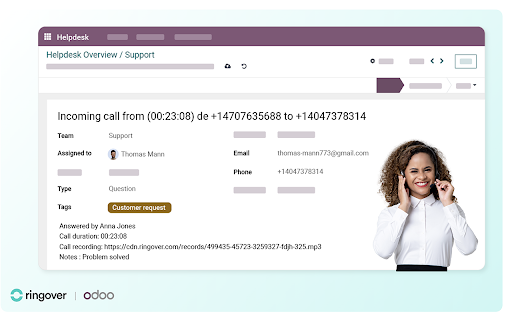
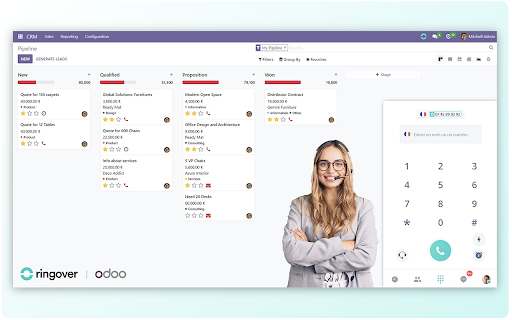
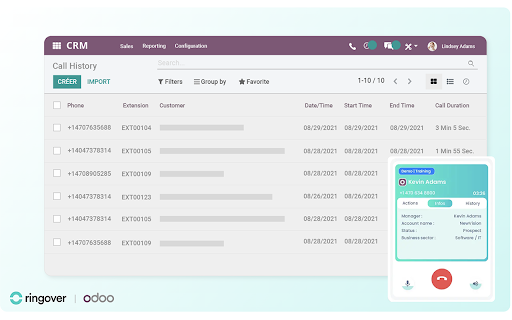
Integrate Ringover's dialer into Odoo for calling, contact management, and support ticket creation directly in the same interface.
Boost your communication experience with the Ringover VoIP Phone for Odoo!
Seamlessly click on any phone number in Odoo to make a call, receive incoming calls, and sync contacts all directly within the platform.
Key features:
Click2Dial: Simply click any phone number in Odoo, and your call is instantly launched from your Ringover dialer. No more copy-pasting numbers!
Inbound Calls: Receive calls directly in Odoo and immediately identify your caller for quicker responses.
Call History: Stay on top of your communications with a detailed call history on each contact’s page, including call recordings and transcripts for a clear, organized overview.
Contact Synchronization: Sync your Odoo contacts with Ringover. Choose between syncing all contacts, storing them on a per-call basis, or keeping no contacts stored.
Qualify Your Interactions: Easily add notes and personalized tags to your calls, directly from the dialer within Odoo.
How to get started:
Sign In / Sign up to Ringover: Enhance your calling experience, by either log in to your Ringover account or, if you're new, sign up for a 7-day free trial with no commitment directly from the extension’s option menu.
Boost your productivity and communication efficiency with the Ringover VoIP Phone for Odoo today!
| 分类 | 💬沟通 |
| 插件标识 | bdeapcnahigpibeoehandgaiijljkdnl |
| 平台 | Chrome |
| 评分 |
★★★★★
5
|
| 评分人数 | 2 |
| 插件主页 | https://chromewebstore.google.com/detail/ringover-voip-phone-for-o/bdeapcnahigpibeoehandgaiijljkdnl |
| 版本号 | 1.4.3 |
| 大小 | 4.15MiB |
| 官网下载次数 | 389 |
| 下载地址 | |
| 更新时间 | 2025-02-13 00:00:00 |
CRX扩展文件安装方法
第1步: 打开Chrome浏览器的扩展程序
第2步:
在地址栏输入: chrome://extensions/
第3步: 开启右上角的【开发者模式】
第4步: 重启Chrome浏览器 (重要操作)
第5步: 重新打开扩展程序管理界面
第6步: 将下载的crx文件直接拖入页面完成安装
注意:请确保使用最新版本的Chrome浏览器
同类插件推荐
Ringover VoIP Phone for Odoo
Integrate Ringover's dialer into Odoo for call
Odoo Toolbox
Enhances the experience of Odoo developers and Odo

Owl devtools
Chrome devtools extension for Odoo Owl frameworkTh

Odoo attendance
Register and check attendance status in Odoo.Make

Odoo Barcode
Simulate barcode scanning!This extension allows yo

Odoo Chatter Utilities
Manage Odoo Chatter and other practical utilitiesE

Odoo CRM Marketing Assistant
Potencia tu Odoo CRM con esta extensión. Con OpenA

Odoo Debug
Minimal and fast extension to toggle debug mode of

Discuss Push-to-talk
Empowers Odoo Discuss with system-wide Push-to-Tal

Ringover Cadence
Extension to extract lead data and import lead to

Jabra ChromeHost (Chrome Extension)
Enables device integration in compatible web appli

Create Odoo leads from LinkedIn
Read LinkedIn contact page and create an Odoo Lead