
Workbench Extension Chrome 插件, crx 扩展下载
Add functionalities to Workbench!
Some new functionalities form the Salesforce Workbench application (https://workbench.developerforce.com/):
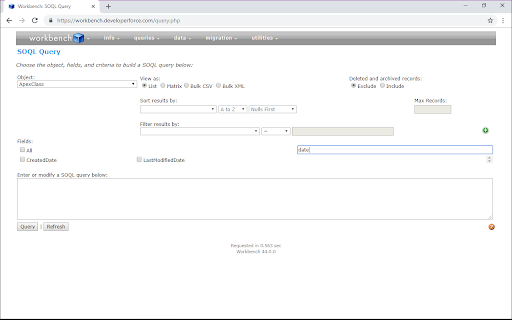
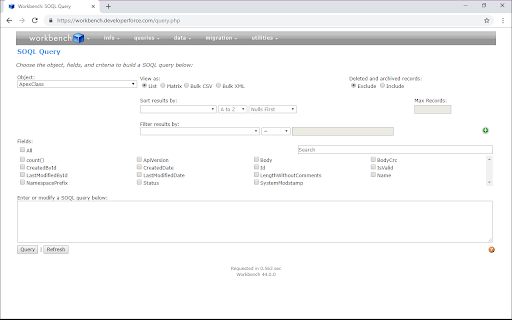
- Resize the window
- Query page: checkbox for fields selection. Paste a request, click "Refresh" => that fill the form. Searching filter. Download displayed result (JSON & CSV)
- Execute page: saving scripts to load easier later.
2023-05-04 (v1.5.1):
- Remove cookies & tabs permissions
2018-10-30 (v1.5.0):
Functionality:
- Save script into the Execute page
2018-10-26 (v1.4.0):
Functionality:
- Download the result displayed on the page. Two format: JSON & CSV
Bug:
- After query, field not displayed.
| 分类 | 📝工作流程与规划 |
| 插件标识 | bdmeigkhhgcjckkgiiipehdagjdlkddj |
| 平台 | Chrome |
| 评分 |
★★★☆☆
3.2
|
| 评分人数 | 14 |
| 插件主页 | https://chromewebstore.google.com/detail/workbench-extension/bdmeigkhhgcjckkgiiipehdagjdlkddj |
| 版本号 | 1.5.1 |
| 大小 | 196KiB |
| 官网下载次数 | 286 |
| 下载地址 | |
| 更新时间 | 2023-05-06 00:00:00 |
CRX扩展文件安装方法
第1步: 打开Chrome浏览器的扩展程序
第2步:
在地址栏输入: chrome://extensions/
第3步: 开启右上角的【开发者模式】
第4步: 重启Chrome浏览器 (重要操作)
第5步: 重新打开扩展程序管理界面
第6步: 将下载的crx文件直接拖入页面完成安装
注意:请确保使用最新版本的Chrome浏览器
同类插件推荐
Workbench Extension
Add functionalities to Workbench!Some new function

Salesforce WorkBench v2.0
Adds WorkBench icon to the Tool Bar. Logs you into

Workbench Tools for Google Chrome™
Google Chrome™ extension for logging into Workbenc
Workbench Enhancer Beta
An extension to add much needed improvements to Sa

Salesforce Enhanced Code Searcher
Enhanced it for custom settings's field search

Salesforce DevTools
Powerful Salesforce developer tools, loved by over

Apex Debugger
Debug Salesforce apex code with easeApex debugging

Salesforce Tool Suite
Compare Salesforce Metadata, Generate Metadata Exc

ORGanizer for Salesforce
ORGanizer - The best Salesforce Extension everThe

Salesforce Colored Favicons
Updates the standard favicon on Salesforce tabs wi

Salesforce Lightning Inspector
For inspecting Lightning appsThe Salesforce Lightn

Lightning Extension
Enhance productivity with new add-on featuresLight

Salesforce Inspector Reloaded
Productivity tools for Salesforce administrators a