
Teamtailor sourcing Chrome 插件, crx 扩展下载

Add a candidate to Teamtailor from whichever site you're browsing
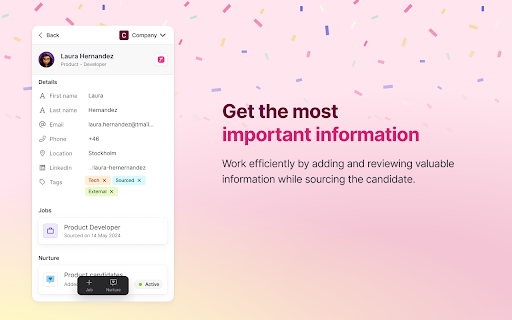
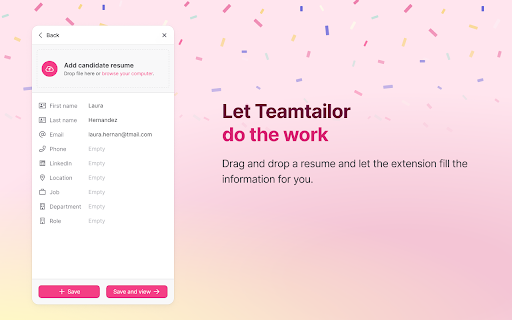
The Teamtailor Chrome Extension enables you to add candidates to Teamtailor from any website you're browsing.
When you find a potential candidate, simply click the Teamtailor extension in Chrome to add them. You can specify which job to associate them with, provide a rating, and add to a Nurture campaign—all without leaving the page where you discovered the candidate. It's a smooth, simple process.
In Teamtailor, you and your team can view the original source page for each candidate on their profile.
Streamline your candidate sourcing process with this extension, adding promising individuals to your talent pool within seconds.
| 分类 | 📝工作流程与规划 |
| 插件标识 | bdmknahgkndejbjefgbkghhpnabglhlp |
| 平台 | Chrome |
| 评分 |
★★★★☆
4.5
|
| 评分人数 | 39 |
| 插件主页 | https://chromewebstore.google.com/detail/teamtailor-sourcing/bdmknahgkndejbjefgbkghhpnabglhlp |
| 版本号 | 23.5.0 |
| 大小 | 1.02MiB |
| 官网下载次数 | 5000 |
| 下载地址 | |
| 更新时间 | 2025-01-10 00:00:00 |
CRX扩展文件安装方法
第1步: 打开Chrome浏览器的扩展程序
第2步:
在地址栏输入: chrome://extensions/
第3步: 开启右上角的【开发者模式】
第4步: 重启Chrome浏览器 (重要操作)
第5步: 重新打开扩展程序管理界面
第6步: 将下载的crx文件直接拖入页面完成安装
注意:请确保使用最新版本的Chrome浏览器
同类插件推荐

HireSweet
Enhance your recruiting experience with HireSweet.

Teamtailor sourcing
Add a candidate to Teamtailor from whichever site

Lever Hire Extension
Import data to Lever Hire▻ Source candidates with

GlossaryTech | Learn tech words
Learn tech terms whilst web sourcingGlossaryTech C

AmazingHiring
Source Tech Candidates with AmazingHiring Extensio

hireEZ for Chrome - Find and Engage Anyone, Anywhere.
Sourcing on LI/ATS, GPT Email Campaigns, AI-assist

Recruit CRM Sourcing Extension
Source candidates & clients from anywhere with

Jiminny Sidekick
The Jiminny Sidekick is your own personal sales as

Lusha - Easily find B2B contact information
Get access to the world’s most accurate global B2B

Dux-Soup for LinkedIn Automation
Get fresh, qualified LinkedIn leads every day with

Email Finder by ContactOut – Email Lookup Tool
Find emails for 75% of Linkedin or ANY website. Sa

Waalaxy - LinkedIn Automation Tool
Make LinkedIn your No. 1 acquisition channel with

Kaspr: B2B Phone Number and Email Finder
Get access to your prospects' phone numbers an