
Image Metadata Viewer Chrome 插件, crx 扩展下载

View EXIF/meta data of images
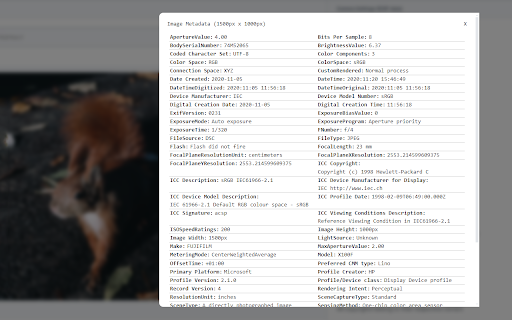
Easily view EXIF or PNG metadata of most images.
Simply right click an image and click "View Image Metadata" to see a popup of all available image data. (Make sure to refresh your open tabs after installing)
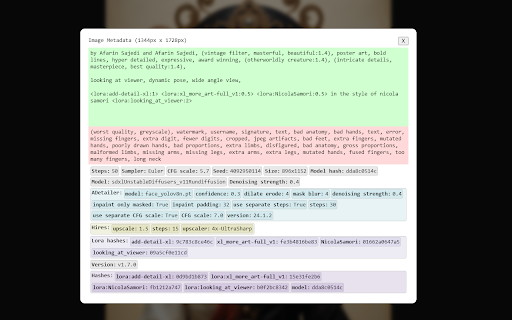
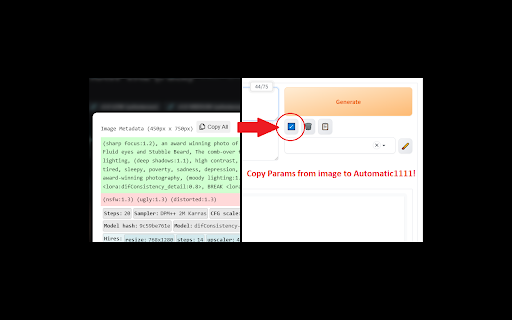
For Stable Diffusion users, there is a specialized layout that intelligently organizes prompt and model parameter data in a readable and copyable way. Works with Automatic1111 and related UIs (does not support ComfyUI nodes yet). Makes tuning parameters for your images much more convenient!
Update: Added button to copy raw sd parameter string.
No ads or other monetization. I was sick of seeing all the broken or ad-ridden extensions claiming to show metadata which should be simple so I made this extension.
More features to be added. If you have ideas for features or bugs, feel free to send me an email.
Note: Does not currently support Adobe XMP tags. Support will be added.
| 分类 | 🎨艺术与设计 |
| 插件标识 | bebloogeelkcpmflbhdhdkppjjbifiih |
| 平台 | Chrome |
| 评分 |
★★★★★
5
|
| 评分人数 | 6 |
| 插件主页 | https://chromewebstore.google.com/detail/image-metadata-viewer/bebloogeelkcpmflbhdhdkppjjbifiih |
| 版本号 | 0.2.1 |
| 大小 | 358KiB |
| 官网下载次数 | 2000 |
| 下载地址 | |
| 更新时间 | 2024-02-14 00:00:00 |
CRX扩展文件安装方法
第1步: 打开Chrome浏览器的扩展程序
第2步:
在地址栏输入: chrome://extensions/
第3步: 开启右上角的【开发者模式】
第4步: 重启Chrome浏览器 (重要操作)
第5步: 重新打开扩展程序管理界面
第6步: 将下载的crx文件直接拖入页面完成安装
注意:请确保使用最新版本的Chrome浏览器
同类插件推荐

ExcaliburAI - Civitai Prompt Extractor
Copies prompt and metadata in clipboard with 1 cli

Civit model downloader
Extension for download models with full metadata f
Get Image Info
The extension displays the webpage image informati

Image Metadata Viewer
View EXIF/meta data of imagesEasily view EXIF or P

Image-Details
Adds a context menu entry to open a popup window w

Image info
Select any image on a page, including background i

View Image Info (properties)
通过右键菜单获取图片的尺寸,URL,文件大小,文件类型等信息@updated on 2023/3/1

Exif Viewer
画像のExif情報をポップアップ表示するこの拡張機能は、外部サイトに画像を送信せずにEXIF情報の解

EXIF Viewer Classic
Quickly access EXIF data of your photos鼠標劃過圖片就可以查看

Exif Viewer
View the EXIF data in your photos. Select photos o

IPTC Photo Metadata inspector
Right-click on any image and select "View IPT

EXIF Viewer Pro
Quick access to EXIF data of any image you viewQui

Ripper Web Content | Capture Metadata Content
Extension that analyses and extracts metadata from