
Secure AI Generated Code Chrome 插件, crx 扩展下载
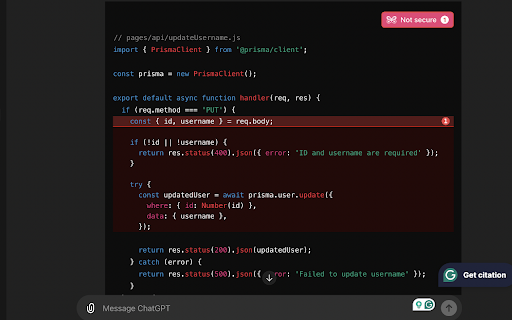
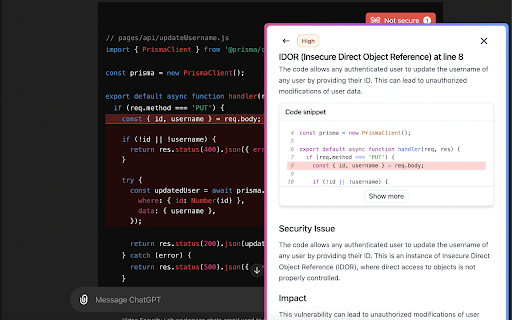
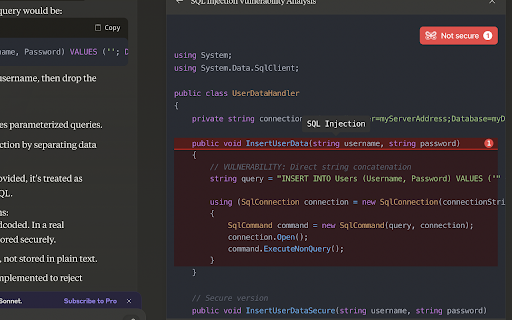
Automatically validates and reviews code generated by chatgpt.com or claude.ai and provides feedback about security issues
### Secure AI Generated Code
Secure AI Generated Code is a must-have Chrome extension for developers using chatgpt.com and claude.ai. This extension automatically scans all code snippets generated on these platforms for potential security issues and provides instant feedback.
**Key Features:**
- **AI-Specific Integration:** Exclusively works with chatgpt.com and claude.ai for accurate security checks.
- **Comprehensive Scanning:** Detects and analyzes all code snippets on the page.
- **Real-Time Warnings:** Displays warnings and detailed feedback when security issues are found.
**Why Install?**
- **Stay Secure:** Identify and fix vulnerabilities early in your development process.
- **Enhance Knowledge:** Learn about common security issues and best practices.
- **Save Time:** Automate the process of reviewing code for security flaws.
- **Peace of Mind:** Ensure your AI-generated code meets industry security standards.
**Who Benefits?**
- **AI Platform Users:** Ideal for developers using chatgpt.com or claude.ai for coding.
- **Security-Conscious Developers:** Perfect for developers who prioritize secure coding practices.
Install Secure AI Generated Code today and code with confidence!
| 分类 | 🔒隐私 |
| 插件标识 | bengiidgkchpliicfplbejjnoennfkmo |
| 平台 | Chrome |
| 评分 |
★★★★★
5
|
| 评分人数 | 5 |
| 插件主页 | https://chromewebstore.google.com/detail/secure-ai-generated-code/bengiidgkchpliicfplbejjnoennfkmo |
| 版本号 | 0.0.3 |
| 大小 | 2.52MiB |
| 官网下载次数 | 46 |
| 下载地址 | |
| 更新时间 | 2024-08-30 00:00:00 |
CRX扩展文件安装方法
第1步: 打开Chrome浏览器的扩展程序
第2步:
在地址栏输入: chrome://extensions/
第3步: 开启右上角的【开发者模式】
第4步: 重启Chrome浏览器 (重要操作)
第5步: 重新打开扩展程序管理界面
第6步: 将下载的crx文件直接拖入页面完成安装
注意:请确保使用最新版本的Chrome浏览器
同类插件推荐
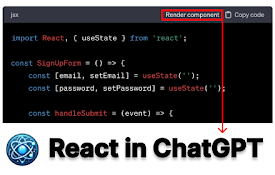
React in ChatGPT
Render React components directly in ChatGPTReact i
AI Chat
Use AI ChatBot for instant access to Anthropic Cla
MATE: AI Code Review
Elevate your code quality with AI-driven reviews f
Secure AI Generated Code
Automatically validates and reviews code generated

AI code analyzer
AI analyzes code with KuaFuAI to help you understa
Search with Variables
Quickly search the web with variables inside the q
GPT Code Assistant
GPT Code Assistant - ChatGPT powered extension for

copy-figma-css
copy-figma-cssEnable this extension and activate t
Edmigo: LeetCode DSA AI Tutor powered by ChatGPT-4
Learn programming 2X faster with Edmigo — your 24/

Codeium: AI Code Autocompletion on all IDEs
Your modern coding superpower. Get code completion
AI Code Generator
Using AI technology, convert screenshots, design d

人工智能写作生成器 - AIFreeBox
AI写作生成器工具:简化文章、博客、社交媒体、营销文案的内容创作。AI写作生成器。? 如何创作吸引人

AI Code Preview
Preview, copy, and download code from AI responses