
Open in Chromium Browser Chrome 插件, crx 扩展下载
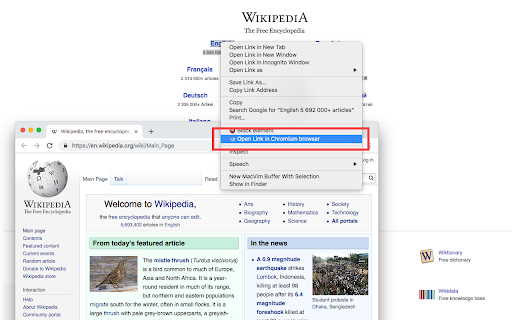

Open the current tab or all tabs in Chromium browser or send links to Chromium from right-click context menu.
Open in Chromium extension opens the current tab or all tabs in Google's Chromium browser. This is useful to transfer links across browsers without manual copy and paste.
Notes:
1. In case a Chromium window is opened, the link is opened in a new browser tab
2. If Chromium is not opened, a new Chromium window gets opened.
3. To open links in the Chromium browser, you will need to install a native client.
4. The instruction to install the native client is displayed once a link opening is requested.
5. At this point, the native client supports the following operating systems:
a. Windows
b. Mac
c. Linux
6. The native client does NOT support Chromium OS.
7. On Windows and Linux, you need to set the Chromium path on the options page for the extension to find the Chromium browser
8. Some preferences of this extension can be configured by the domain administrator (managed storage)
9. This extension can send links on left-click, a combination of the left-click and a keyboard meta key, and top-level navigation
--- Legal
Chromium is a trademark of Google Inc., registered in the U.S. and other countries. This extension is an independent project and has no relationship to the Chromium team or Google Inc.
| 分类 | 📝工作流程与规划 |
| 插件标识 | bhfenhhfpcpkknkahnlogooiodcofkjl |
| 平台 | Chrome |
| 评分 |
★★★★☆
4.6
|
| 评分人数 | 424 |
| 插件主页 | https://chromewebstore.google.com/detail/open-in-chromium-browser/bhfenhhfpcpkknkahnlogooiodcofkjl |
| 版本号 | 0.2.2 |
| 大小 | 115KiB |
| 官网下载次数 | 5000 |
| 下载地址 | |
| 更新时间 | 2023-09-25 00:00:00 |
CRX扩展文件安装方法
第1步: 打开Chrome浏览器的扩展程序
第2步:
在地址栏输入: chrome://extensions/
第3步: 开启右上角的【开发者模式】
第4步: 重启Chrome浏览器 (重要操作)
第5步: 重新打开扩展程序管理界面
第6步: 将下载的crx文件直接拖入页面完成安装
注意:请确保使用最新版本的Chrome浏览器
同类插件推荐

Open in Chromium Browser
Open the current tab or all tabs in Chromium brows

Copy All URLs (Free)
A simple Chrome extension to copy URLs of all open

Google Chrome™扩展程序管理器
直接从任何Chrome窗口轻松管理浏览器中所有已安装的扩展程序。管理扩展,快速启用/禁用扩展。 功

Bookmark Manager per Domain and Page
A Bookmark Manager to list all bookmarks for the d