
Tab Page & Window Resizer Chrome 插件, crx 扩展下载

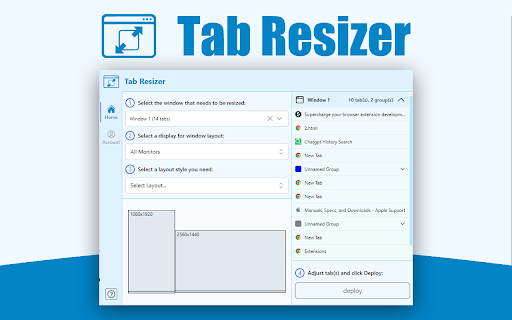
Simplify browsing with resizable current tab page, multi-monitor support, and customizable layouts for enhanced productivity.
Tab Page & Window Resizer Chrome Extension is a powerful tool designed to help users manage their browser tabs effectively, boosting productivity and organization. With this extension, users can bid farewell to tab clutter and streamline their workflow for enhanced efficiency.
Key features of Tab Page & Window Resizer include:
Tab Management: Easily organize and manage your open tabs with intuitive controls. You can group related tabs together, arrange them in a specific order, and even save tab configurations for later use.
Screen Splitting: Split your screen into multiple sections, allowing you to view and interact with different tabs simultaneously. This feature is especially handy for multitasking and comparing information from various sources.
Customization Options: Tab Resizer offers a range of customization options to tailor the extension to your preferences. Adjust the size and layout of tab groups, choose different viewing modes, and personalize your browsing experience.
Productivity Boost: By decluttering your tab bar and optimizing your workspace, Tab Resizer helps you focus on the task at hand and complete your work more efficiently. With fewer distractions and easier access to relevant tabs, you can get things done faster than ever before.
Overall, Tab Resizer Chrome Extension is a valuable tool for anyone who frequently works with multiple browser tabs and wants to optimize their browsing experience for maximum productivity. Whether you're a professional researcher, student, or avid internet user, this extension can help you stay organized and make the most of your online activities.
| 分类 | 🛠️工具 |
| 插件标识 | bhfhapnakcccmegcegfefefdndfbilge |
| 平台 | Chrome |
| 评分 |
★★★★☆
4.6
|
| 评分人数 | 7 |
| 插件主页 | https://chromewebstore.google.com/detail/tab-page-window-resizer/bhfhapnakcccmegcegfefefdndfbilge |
| 版本号 | 0.0.4 |
| 大小 | 720KiB |
| 官网下载次数 | 50 |
| 下载地址 | |
| 更新时间 | 2024-08-04 00:00:00 |
CRX扩展文件安装方法
第1步: 打开Chrome浏览器的扩展程序
第2步:
在地址栏输入: chrome://extensions/
第3步: 开启右上角的【开发者模式】
第4步: 重启Chrome浏览器 (重要操作)
第5步: 重新打开扩展程序管理界面
第6步: 将下载的crx文件直接拖入页面完成安装
注意:请确保使用最新版本的Chrome浏览器
同类插件推荐

Tab Page & Window Resizer
Simplify browsing with resizable current tab page,
Window Resizer
Resize browser windows to test layouts on differen

Better Ruler
一款网页测量工具,支持吸附测量。为前端开发和ui设计提供便利。一款网页测量工具,支持吸附测量。为前端

Reader View
剥离按钮、背景图像等杂物,改变页面的文字大小、对比度和布局,以提高可读性Reader View ex