
Get Title Chrome 插件, crx 扩展下载
Easy to access page title.
Chrome Extension for copying the title of a web page.
This chrome extension helps some kind of task.
For eaxmple create a list of web pages.
It can copy the title of a web page with a single click.
How to use it.
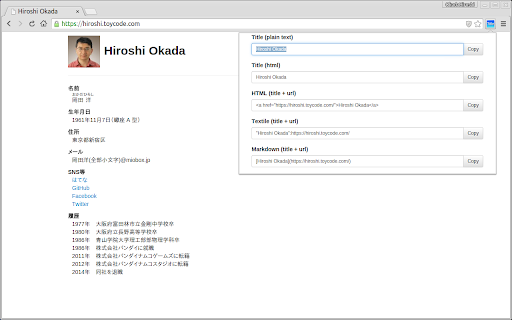
Click on the "Title" icon.
A Pop-up window opens and you will see both the title and the link of the web page you are currently viewing.
Since the title is already copied at this time, paste it if you like.
In addition, the link text displayed some formats such as HTML, Textile and Markdown, you can also use it by pressing the copy button that appears to the left of the texts.
| 分类 | 🛠️工具 |
| 插件标识 | bibfbedpleobipmaiaejohhiegjlhcba |
| 平台 | Chrome |
| 评分 |
★★★☆☆
3.1
|
| 评分人数 | 14 |
| 插件主页 | https://chromewebstore.google.com/detail/get-title/bibfbedpleobipmaiaejohhiegjlhcba |
| 版本号 | 2.0 |
| 大小 | 31.65KiB |
| 官网下载次数 | 588 |
| 下载地址 | |
| 更新时间 | 2024-07-19 00:00:00 |
CRX扩展文件安装方法
第1步: 打开Chrome浏览器的扩展程序
第2步:
在地址栏输入: chrome://extensions/
第3步: 开启右上角的【开发者模式】
第4步: 重启Chrome浏览器 (重要操作)
第5步: 重新打开扩展程序管理界面
第6步: 将下载的crx文件直接拖入页面完成安装
注意:请确保使用最新版本的Chrome浏览器
同类插件推荐

Copy URL with Title (plain text/markdown)
Copy the title and URL in plain text/markdown form

copy 2 clipboard with ease
a simple way to copy tab title and url with easeFe
Copy page title and url
Add a context menu item to copy page title (or sel

Title & URL
It's for copying current page's title and

Copy Page Title and URL
A Chrome extension that allows you to copy both th

Copy title & URL
Copy title & URLCopy the title and URL of an o

Get Title
Easy to access page title.Chrome Extension for cop

Title with URL
Get the active web page's title and URL.You ca

Copy Cat
Quickly copy the title of page and url into your c

Add URL to page title
Simply adds the URL to the title bar.This put the

CopyTabTitleUrl
Copy the title and URL to the clipboard.You can cu

Copy Title and Url as Markdown Style
Copy the title and url of the page as Markdown sty

Copy Link With Title
This extension copies the current tab's link a