
ScreenApp - Record and take AI notes of meetings, videos, calls & lectures Chrome 插件, crx 扩展下载
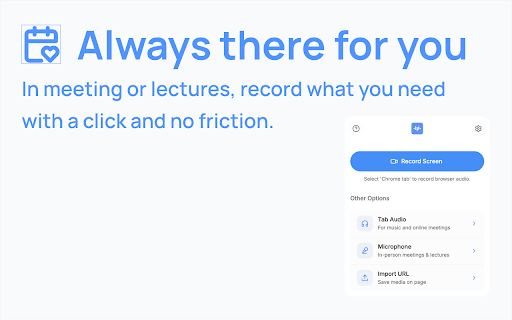


Easily record your screen and audio with ScreenApp. Take AI Notes and summaries of any recording.
ScreenApp. Transcribe audio and screen content right from your browser or any URL. Perfect for capturing notes and summaries from lectures, meetings, webinars, podcasts, and beyond.
What it does:
✨ Turns audio and video into text.
? Works seamlessly in your browser—no downloads needed.
? Pulls in content from web links.
?️ Simplifies note-taking from any source.
? Creates concise summaries effortlessly.
Why you’ll love it:
⏳ Saves time with instant transcription.
? Keeps everything organized in one place.
? Makes sharing a breeze.
How it works:
1️⃣ Add ScreenApp to your browser.
2️⃣ Start Recording
3️⃣ Save and process with AI
4️⃣ Chat and Summarize
| 分类 | 📝工作流程与规划 |
| 插件标识 | bindfabgapagoeaolcbpocelliddgbca |
| 平台 | Chrome |
| 评分 |
★★★★☆
4.6
|
| 评分人数 | 11 |
| 插件主页 | https://chromewebstore.google.com/detail/screenapp-record-and-take/bindfabgapagoeaolcbpocelliddgbca |
| 版本号 | 2.0 |
| 大小 | 159KiB |
| 官网下载次数 | 10000 |
| 下载地址 | |
| 更新时间 | 2025-02-27 00:00:00 |
CRX扩展文件安装方法
第1步: 打开Chrome浏览器的扩展程序
第2步:
在地址栏输入: chrome://extensions/
第3步: 开启右上角的【开发者模式】
第4步: 重启Chrome浏览器 (重要操作)
第5步: 重新打开扩展程序管理界面
第6步: 将下载的crx文件直接拖入页面完成安装
注意:请确保使用最新版本的Chrome浏览器
同类插件推荐

ScreenApp - Record and take AI notes of meetings, videos, calls & lectures
Easily record your screen and audio with ScreenApp
截屏和屏幕视频录制 - Screeny
排名第一的屏幕录像和截图工具!全屏截图和屏幕录像。这是一款用于截取屏幕截图和录制屏幕视频的简单工具。
截圖工具
屏幕捕获和屏幕录制工具以记录屏幕。充分利用您的屏幕捕获!免费截取屏幕快照。Introducing t

Potion Screen Recorder - Easily Create Personalized AI Videos
Convert screen recordings into personalized AI vid