
Pin Tweet to IPFS Chrome 插件, crx 扩展下载

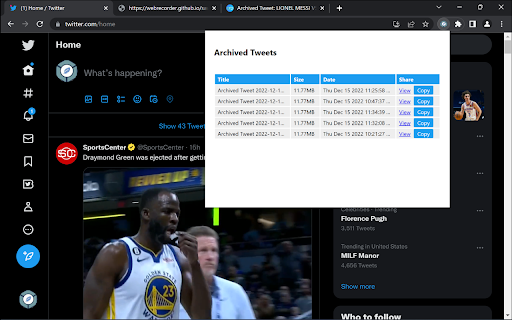



An extension to help you pin tweets to IPFS, allowing users to store tweets for archival purposes.
Archive tweets to IPFS. The extensions assists users in creating a WebARChive file and uploads to web3.storage so it can be accessed over IPFS without the user installing and setting up a local instance of Kubo.
Heavily utilizes a tool built by WebRecorder to archive tweets specifically, https://webrecorder.github.io/save-tweet-now/
| 分类 | 💻开发者工具 |
| 插件标识 | bkbejdaeamaehgpodkjdbkhkofpijagn |
| 平台 | Chrome |
| 评分 |
★★★★★
5
|
| 评分人数 | 2 |
| 插件主页 | https://chromewebstore.google.com/detail/pin-tweet-to-ipfs/bkbejdaeamaehgpodkjdbkhkofpijagn |
| 版本号 | 5.0.5 |
| 大小 | 110KiB |
| 官网下载次数 | 92 |
| 下载地址 | |
| 更新时间 | 2023-11-07 00:00:00 |
CRX扩展文件安装方法
第1步: 打开Chrome浏览器的扩展程序
第2步:
在地址栏输入: chrome://extensions/
第3步: 开启右上角的【开发者模式】
第4步: 重启Chrome浏览器 (重要操作)
第5步: 重新打开扩展程序管理界面
第6步: 将下载的crx文件直接拖入页面完成安装
注意:请确保使用最新版本的Chrome浏览器
同类插件推荐

tweetpin.it for Chrome
Create boards by pinning directly from twitter.com

Stopaganda
Adds informative decals to Facebook posts; see REA

IPFS Support
Adding standalone IPFS native URL support for chro
Pin Tweet to IPFS
An extension to help you pin tweets to IPFS, allow

IPFS Search
A simple tool to search on IPFS.This extension all

IPFS 伴侣
在浏览器中应用IPFS扩展Feature Highlight: – Detect reques

Breakdown, for Mint and Personal Capital
Breakdown slices and dices transactions downloaded

Bitbaguette
A browser extension extending Bitbucket's inte

Unwanted Opinions
Lets you block tweets using various options.Unwant

Hop
An icon-first bookmark managerSee, click, go ? In

FYBR
FYBR: clean inbox clean mindClean inbox. Clean min

BlackLimpkin: become 10x more productive on LinkedIn
Stop wasting time and become 10x more productive o

CSGO Stats Rank Tracker
Helps to track wins/loses/ties/KDA stats after ran