
Chrome Tab Switcher Chrome 插件, crx 扩展下载
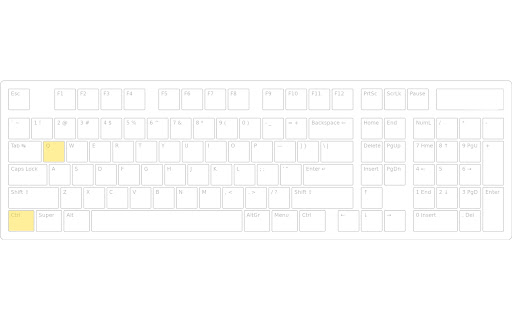
Switches tabs in the order you used them (use Ctrl+Q or Ctrl+Shift+Q to swith backward or forward in tab history)
If you find Chrome's default tab switching behavior unsatisfying, and you would like to switch tabs based on your usage, remembering what tabs you used recently, you should give this extension a try.
Using the keyboard shortcut Ctrl+Q, or Ctrl+Shift+Q you'll be able to have the improved tab switching you expect. (we use Q key as TAB key is disallowed by chrome for accessibility reasons).
Please me know your thoughts and if you find bugs I would appreciate if you report them so we make this extension better for everyone.
| 分类 | 📝工作流程与规划 |
| 插件标识 | bkbgaghgmheigkbmnjkhekclllokejml |
| 平台 | Chrome |
| 评分 |
★★★★☆
4.6
|
| 评分人数 | 244 |
| 插件主页 | https://chromewebstore.google.com/detail/chrome-tab-switcher/bkbgaghgmheigkbmnjkhekclllokejml |
| 版本号 | 1.0 |
| 大小 | 10.93KiB |
| 官网下载次数 | 30 |
| 下载地址 | |
| 更新时间 | 2021-10-13 00:00:00 |
CRX扩展文件安装方法
第1步: 打开Chrome浏览器的扩展程序
第2步:
在地址栏输入: chrome://extensions/
第3步: 开启右上角的【开发者模式】
第4步: 重启Chrome浏览器 (重要操作)
第5步: 重新打开扩展程序管理界面
第6步: 将下载的crx文件直接拖入页面完成安装
注意:请确保使用最新版本的Chrome浏览器
同类插件推荐
Chrome Tab Switcher
Switches tabs in the order you used them (use Ctrl
DDT - Don't Dupe Tabs
Tries to help people with a compulsive tabs openin
Tab Switch Extension
Navigate between recently active tabs using custom

Switch Tab Shortcut
Customize chrome shortcut to switch tabsSimple ext
Switch Tabs
The easiest way to switch tabs on Google Chrome.Sw

Recent Tabs
Cycle through your most recently used tabs (MRU) l

Switch between recent tabs (MRU tabs switch)
Use a keyboard shortcut to switch between two most
CLUT: Cycle Last Used Tabs
Cycle through last used Chrome tabs using keyboard

Tab Thumbnails Switcher
Use Ctrl+Tab to switch between tabs in MRU order,
Previous Tab
Switch back to the previously active tab using the

Open Last Tab
Cycle through last used Chrome tabs using keyboard

Ctrl+Tab MRU
Switch between tabs in the most recently used orde

切換最後一個選項卡
使用快捷鍵 <Alt + Q>(或定義您自己的)在兩個最近使用的選項卡之間切換。 需要一