
Worldwide Clock Extension Chrome 插件, crx 扩展下载
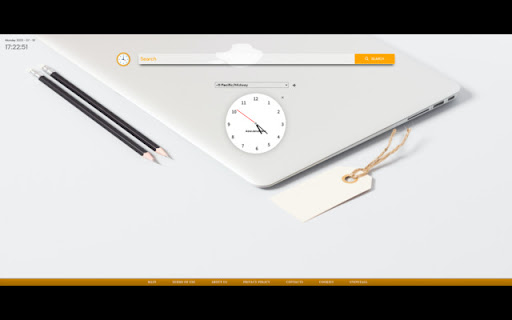
An extension that groups together clocks from all the time zones that are relevant to you and conveniently shows
The ultimate extension that helps you stay connected with every part of the world. Perfect for people who's relatives or loved ones live overseas, or to those who conduct business internationally in their line of work.
By Clicking "add to Chrome", I accept and agree to installing Worldwide Clock Extension and setting Chrome New Tab search provider to Microsoft Bing as described by the services in terms of use https://onlineleonz.com/terms-of-use/ and privacy policy https://onlineleonz.com/privacy-policy/
How it works:
Users can choose which clocks they want to showcase every time they open a new window or tab by clicking on the drop down menu and choosing their desired time zones. After a time zone is chosen, users need to click the "+" sign on the right side of the menu to add the clock. Users can remove certain clocks by clicking the "X" button on the top right corner of each clock. The clocks chosen will carry over to new tabs or windows, so no need to choose them again every time a new one is opened.
Alongside the worldwide clocks, users will be show a digital clock on the top left corner of the screen which tells the current time in their location, as well as the current date.
You may uninstall the extension at any time
To remove our extension from Google Chrome:
1) Click on the three vertical dots icon in the upper right-hand corner of your Chrome browser
2) Go to "Settings"
3) In the left menu that appears, click on "Extensions"
4) From the list of installed Extensions, locate the extension you would like to uninstall
| 分类 | ♿无障碍访问 |
| 插件标识 | bmjohpdlphnlajmceppkgnfddpkbaanl |
| 平台 | Chrome |
| 评分 |
★★★★★
5
|
| 评分人数 | 1 |
| 插件主页 | https://chromewebstore.google.com/detail/worldwide-clock-extension/bmjohpdlphnlajmceppkgnfddpkbaanl |
| 版本号 | 1.0.2 |
| 大小 | 639KiB |
| 官网下载次数 | 30000 |
| 下载地址 | |
| 更新时间 | 2023-07-17 00:00:00 |
CRX扩展文件安装方法
第1步: 打开Chrome浏览器的扩展程序
第2步:
在地址栏输入: chrome://extensions/
第3步: 开启右上角的【开发者模式】
第4步: 重启Chrome浏览器 (重要操作)
第5步: 重新打开扩展程序管理界面
第6步: 将下载的crx文件直接拖入页面完成安装
注意:请确保使用最新版本的Chrome浏览器
同类插件推荐

Personalized Backgrounds
Customize your browsing experience with personaliz

Wingman Clock
Wingman Clock: Keep track of time with style. A sl

Nature Wallpapers
Over 100+ of the best nature wallpaper images with

My Weather
The weather at your fingertips with 'My Weathe

Ultimate Basketball Fan Extension
The ultimate basketball themed extension, made by

Architecture Tab
Inspiration Architecture From Around The WorldArch
Worldwide Clock Extension
An extension that groups together clocks from all

Tally Tab
Your New Tab CalculatorTally provides you with a h

Plantastic Tab
Plantastic Tab is a Chrome Extension for the New T

ComedyTab
Open Tabs of LaughterGet a laugh in between openin

NFT Tab
See currently trending NFTs in every new tab that

MyWallPaper
Default search page for Chrome. You can set custom

Quotes Srch Tab
Google Chrome extension designed to bring a beauti