
Coderstool – Online Code Formatter, Converter & Developer Tools Chrome 插件, crx 扩展下载
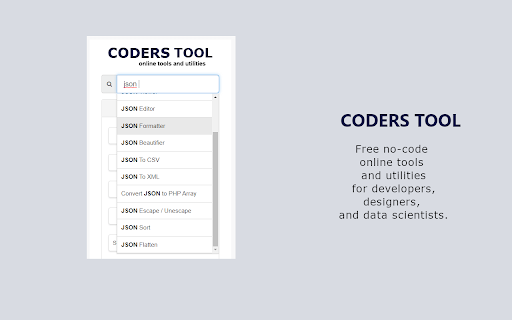
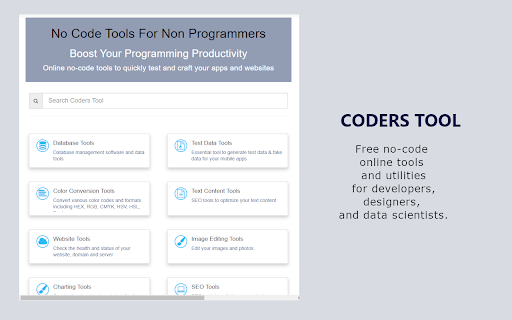

All-in-one tools for formatting, conversion, generators, and debugging—ideal for web developers and programmers!
Coderstool is a comprehensive package of essential online developer tools designed for web developers and programmers. It offers quick access to utilities that enhance efficiency, reduce errors, and maintain a smooth workflow for tasks like debugging, formatting, and converting code, all for free.
No-code toolkit - Encoders & Decoders, Data Formatters & Generators, Code Editors & Debuggers, Converters & Minifiers, Image Editing & Optimization, Calculators & Validators, Viewers & Analyzers, Security & Encryption Tools, SEO & Network Utilities, Database & Algorithm Tools.
## In-Demand Tools ##
++ JSON Formatter & Validator – Quickly format and validate JSON data for clarity.
++ HTML Beautifier & Formatter – Clean up and optimize your HTML code effortlessly.
++ CSS Beautifier & Minifier – Enhance and compress your CSS for better performance.
++ JavaScript Formatter & Compressor – Format, beautify, and compress JavaScript code.
++ URL Encoder & Decoder – Easily convert URLs for safe and correct web usage.
++ Base64 Encoder & Decoder – Encode or decode Base64 strings in seconds.
++ XML Formatter & Validator – Organize and validate XML data for easier debugging.
++ SQL Formatter – Beautify SQL queries to improve readability and maintenance.
++ Regex Tester & Debugger – Test and fine-tune your regular expressions interactively.
++ Markdown Converter – Seamlessly convert markdown text to HTML and vice versa.
++ HTML Minifier – Compress HTML code to reduce file sizes without losing functionality.
++ CSS Minifier – Minify CSS files to boost page load speed.
++ JavaScript Obfuscator – Protect your code by obfuscating JavaScript effectively.
++ Hash Generator (MD5/SHA) – Generate secure hashes for data integrity and security.
++ Random Password Generator – Create strong, random passwords for enhanced security.
++ Lorem Ipsum Generator – Generate placeholder text for design mockups and testing.
++ CSV Formatter – Format CSV data for clear and structured presentation.
++ Code Diff Checker – Compare code snippets to spot differences quickly.
++ Data URI Converter – Convert files into data URIs for easy resource embedding.
++ Color Picker & Converter – Select and convert colors effortlessly for design needs.
Designed with a clean and intuitive interface, Coderstool lets you streamline everyday coding tasks without switching between multiple websites or applications.
| 分类 | 📝工作流程与规划 |
| 插件标识 | bmojppephkmpfcpobohhohljicnkdpnh |
| 平台 | Chrome |
| 评分 |
★★★★☆
4.8
|
| 评分人数 | 196 |
| 插件主页 | https://chromewebstore.google.com/detail/coderstool-–-online-code/bmojppephkmpfcpobohhohljicnkdpnh |
| 版本号 | 1.3 |
| 大小 | 29.91KiB |
| 官网下载次数 | 449 |
| 下载地址 | |
| 更新时间 | 2025-02-11 00:00:00 |
CRX扩展文件安装方法
第1步: 打开Chrome浏览器的扩展程序
第2步:
在地址栏输入: chrome://extensions/
第3步: 开启右上角的【开发者模式】
第4步: 重启Chrome浏览器 (重要操作)
第5步: 重新打开扩展程序管理界面
第6步: 将下载的crx文件直接拖入页面完成安装
注意:请确保使用最新版本的Chrome浏览器
同类插件推荐

Codeium: AI Code Autocompletion on all IDEs
Your modern coding superpower. Get code completion

Hackertab.dev - developer news
All developer news in one tabKeep up with the late

SQL 格式化程序
在文本框中格式化 SQL 或从文件中读取/格式化想要格式化您的 SQL 文件以使其更具可读性? 立

CodeBeautify
All Developer Friendly tools at your finger tips s

IT-Tools
方便的在线工具箱,专为开发者设计!一系列方便开发者使用的在线工具,具有良好的用户体验。iToolki

Coderstool – Online Code Formatter, Converter & Developer Tools
All-in-one tools for formatting, conversion, gener

HiddenTools for Google Chrome™
The easiest way to access all the productivity set

MagicFormula
Master Spreadsheet & Database with AI - Turn t

Web Editor
Forget about all the Code chaos and Customize your

d3coder
编码/解码插件,支持包括base64,rot13 或unix timestamp编码的转换This

XSS
Web Development toolA chrome extension tool that c

h4ck3r
All in one Red Team Developer Tool KitA Browser Ex

Hack-Tools
The all in one Red team extension for web penteste