
DragIt! Chrome 插件, crx 扩展下载
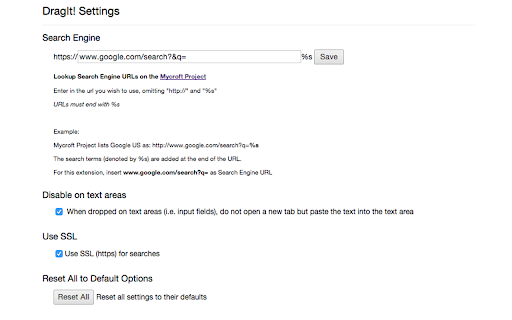
Drag & drop links or selected text to open/search in new tab. Drag right for a new, focused tab. Drag left for a new, unfocused tab.
Search (default Google): Select text, then drag and drop it to a blank area.
Open link in a new tab: Drag a link and drop it.
Drag to right: Open link/search in focused tab (foreground)
Drag to left: Open link/search in unfocused tab (background)
----------------------
**What's New**
v1.7
- Fixed foreground/background tab opening caused by deprecated Chrome API
- Updated to Manifest V3
v1.6
- Fixed error when search engine formatted incorrectly
v1.5
- SSL searches by default
- Reset options button
- Bugfixes
v1.4
- Bugfixes
v1.3
- Added option to disable DragIt! when text dropped to input field
- Updated options page
v1.2
- Minor bugfix
v1.1
- Change the DragIt! search engine on the options page.
| 分类 | 🛠️工具 |
| 插件标识 | bnmedfjfiggbacggokfddhocaignedbk |
| 平台 | Chrome |
| 评分 |
★★★★☆
4.4
|
| 评分人数 | 21 |
| 插件主页 | https://chromewebstore.google.com/detail/dragit/bnmedfjfiggbacggokfddhocaignedbk |
| 版本号 | 1.7.0 |
| 大小 | 35.5KiB |
| 官网下载次数 | 2000 |
| 下载地址 | |
| 更新时间 | 2023-12-30 00:00:00 |
CRX扩展文件安装方法
第1步: 打开Chrome浏览器的扩展程序
第2步:
在地址栏输入: chrome://extensions/
第3步: 开启右上角的【开发者模式】
第4步: 重启Chrome浏览器 (重要操作)
第5步: 重新打开扩展程序管理界面
第6步: 将下载的crx文件直接拖入页面完成安装
注意:请确保使用最新版本的Chrome浏览器
同类插件推荐

Right Click Opens Link New Tab
Right Click Opens Link in New Tab in the Correct O

Open Selected Links
Opens multiple links in the selected content in th
uSuperDrag
Drag selected text to search for and link to open
DragIt!
Drag & drop links or selected text to open/sea