
ChatGPT Chart Previewer Chart Maker Chrome 插件, crx 扩展下载
ChatGPT Chart Previewer Chart Maker
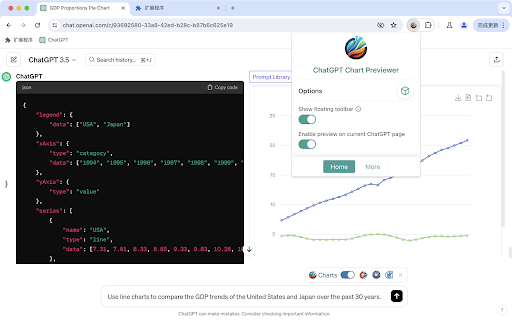
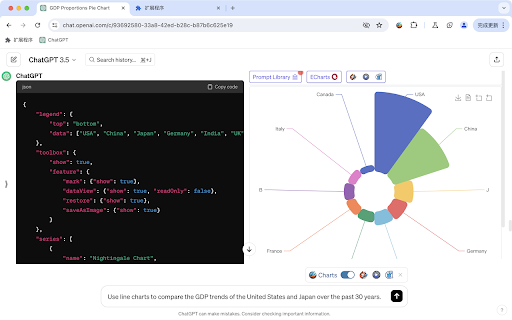
Turn ChatGPT into your chart drawing assistant.
Companion GPTs:
https://chat.openai.com/g/g-T8PdfcCzR-any-chart-maker-line-bar-area-pie-polar-flow
Prompt
```
Use the echarts data format to output JSON data.
Ensure the data is in valid JSON format, and do not include any comments in the JSON.
Do not fabricate data, and do not use any functions.
Use the data I provide, or real data you are aware of, or look up relevant data online.
Each dialogue should output the complete format of the echarts data, do not omit, and do not use ellipsis to replace JSON data previously mentioned.
Output JSON in one codeblock.
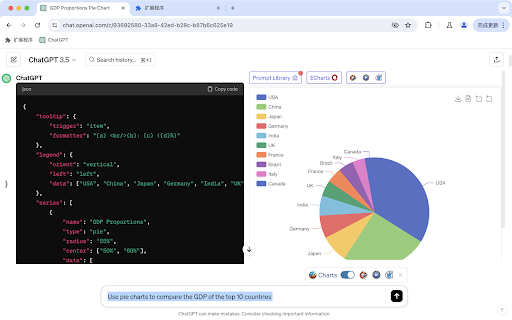
Output the GDP proportions of countries around the world, using a pie chart.
```
Features:
- Using your own data, tell ChatGPT your requirements and instantly receive beautiful visualized graphics.
- Alternatively, with ChatGPT's web browsing capability, simply state your request and get the latest visualized data results that you care about.
- Supporting line charts, bar charts, pie charts, scatter plots, and over 100 types of graphics, covering all application scenarios.
- Download the graphics as high-definition images and apply them to PPTs, documents, web pages, and anywhere else.
Usage examples:
- Compare the GDP growth of China, the United States, Japan, South Korea, France, Germany over the last 30 years, and display it as a line chart.
- Show the growth of NASDAQ over the last 30 years in a line chart.
- Visualize the population proportions of major countries worldwide and display them in a pie chart.
- Provide your annual sales data and let ChatGPT transform it into a bar chart display.
| 分类 | 🛠️工具 |
| 插件标识 | bogannehcoegblbegkklfdboilgimjaa |
| 平台 | Chrome |
| 评分 |
★★★★☆
4.8
|
| 评分人数 | 350 |
| 插件主页 | https://chromewebstore.google.com/detail/chatgpt-chart-previewer-c/bogannehcoegblbegkklfdboilgimjaa |
| 版本号 | 2024.09.16 |
| 大小 | 920KiB |
| 官网下载次数 | 409 |
| 下载地址 | |
| 更新时间 | 2024-09-17 00:00:00 |
CRX扩展文件安装方法
第1步: 打开Chrome浏览器的扩展程序
第2步:
在地址栏输入: chrome://extensions/
第3步: 开启右上角的【开发者模式】
第4步: 重启Chrome浏览器 (重要操作)
第5步: 重新打开扩展程序管理界面
第6步: 将下载的crx文件直接拖入页面完成安装
注意:请确保使用最新版本的Chrome浏览器
同类插件推荐
ChatGPT Chart Previewer Chart Maker
ChatGPT Chart Previewer Chart MakerTurn ChatGPT in

ChatGPT Equation Renderer
Display equations in ChatGPT using Latex notationT

ChatGPT Organizer
Chrome extension To organize chats in ChatGPTChatG

ChatGPT Batch Delete History Manager
ChatGPT Batch Delete History ManagerFeatures: - Ba