
Hide Tabs (Panic Button) Chrome 插件, crx 扩展下载
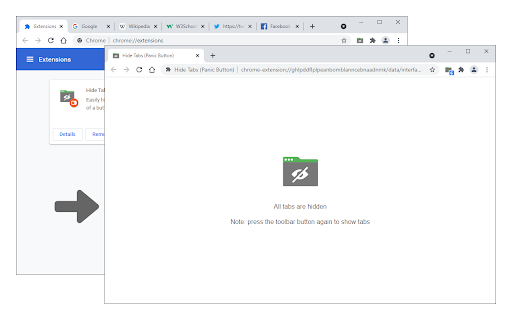
Easily hide and restore all open tabs with the click of a button!
Hide Tabs (Panic Button) is an extension that lets you easily hide and restore all tabs.
To hide (close) all tabs, please press on the toolbar icon once. Next time when you click on the toolbar button again, all hidden tabs are restored to the previous session. Please note that this addon does not have any settings or options to adjust. Instead of the toolbar button, you can use the keyboard shortcut (Alt+Shift+A) to hide and restore tabs.
To report bugs, please fill the bug report form on the addon's homepage (https://mybrowseraddon.com/hide-tabs.html).
| 分类 | 🛠️工具 |
| 插件标识 | cbaflamlbiffgoclkalmhboabeohfoke |
| 平台 | Chrome |
| 评分 |
★★★★☆
4.6
|
| 评分人数 | 57 |
| 插件主页 | https://chromewebstore.google.com/detail/hide-tabs-panic-button/cbaflamlbiffgoclkalmhboabeohfoke |
| 版本号 | 0.1.5 |
| 大小 | 32.49KiB |
| 官网下载次数 | 8000 |
| 下载地址 | |
| 更新时间 | 2024-08-01 00:00:00 |
CRX扩展文件安装方法
第1步: 打开Chrome浏览器的扩展程序
第2步:
在地址栏输入: chrome://extensions/
第3步: 开启右上角的【开发者模式】
第4步: 重启Chrome浏览器 (重要操作)
第5步: 重新打开扩展程序管理界面
第6步: 将下载的crx文件直接拖入页面完成安装
注意:请确保使用最新版本的Chrome浏览器
同类插件推荐
Hide Tabs (Panic Button)
Easily hide and restore all open tabs with the cli
Hide!!! - Panic Button and Tab Manager
Instantly hide and restore your open tabs.Pretend

重新打开关闭的标签
重新打开已关闭的标签页:只需点击一下即可轻松恢复关闭的标签页。通过方便的 "重新打开标签页

恢复关闭的标签页
? 一键恢复您已关闭的标签页,无需快捷键!厌倦了意外关闭重要标签页却无法迅速找回? 我们的插件让您只