
WA Unknown Number Extractor Chrome 插件, crx 扩展下载
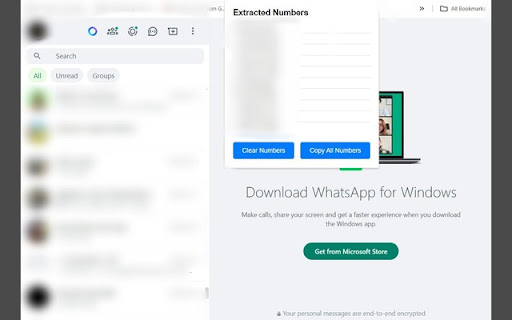
Extract unknown phone numbers from WhatsApp messages.
Effortlessly manage customer inquiries and build your contact database from WhatsApp Web!
For businesses, managing customer inquiries on WhatsApp can be a daunting task, especially when dealing with numerous messages from unknown numbers. The WhatsApp Number Extractor extension streamlines this process, allowing you to effortlessly gather, copy, and clear phone numbers directly from WhatsApp Web.
Key Features:
Real-time Extraction: Automatically detect and extract phone numbers from your WhatsApp Web conversations as you scroll through your chat history.
Copy All Numbers: Quickly copy all extracted phone numbers to your clipboard with a single click, making it easy to transfer numbers to other applications or documents.
Clear Numbers: Easily clear the list of extracted phone numbers to start fresh whenever needed.
User-friendly Interface: Simple and intuitive design ensures a seamless experience for users of all technical levels.
Use Cases:
Customer Relationship Management: Businesses receiving numerous inquiries from potential customers can use this extension to efficiently build a database of contact numbers, enhancing their customer relationship management (CRM) efforts.
Lead Generation: Sales teams can quickly compile lists of prospective leads from WhatsApp conversations, facilitating follow-ups and conversions.
Event Management: Event organizers can collect phone numbers of participants and attendees from WhatsApp messages, ensuring streamlined communication and coordination.
Support Teams: Customer support teams can maintain an organized list of phone numbers from support inquiries, improving response times and customer satisfaction.
How It Works:
Install: Add the WhatsApp Number Extractor extension to your Chrome browser.
Extract: Open WhatsApp Web and scroll through your conversations. The extension will automatically detect and extract phone numbers.
Manage: Open the extension popup to view the list of extracted numbers. Use the "Copy All Numbers" button to copy them to your clipboard or the "Clear Numbers" button to remove them from the list.
Privacy and Security:
Your privacy is our priority. This extension only processes the phone numbers within your WhatsApp Web page and does not store or transmit any data outside of your local storage.
Get Started:
Enhance your productivity and customer management by simplifying the process of collecting and managing phone numbers from WhatsApp Web. Install the WhatsApp Number Extractor today and experience a smarter way to handle your contacts!
| 分类 | 🛠️工具 |
| 插件标识 | cbkglcdjljopbjmhmglfhgiflngijnll |
| 平台 | Chrome |
| 评分 |
★★★★☆
4.9
|
| 评分人数 | 1352 |
| 插件主页 | https://chromewebstore.google.com/detail/wa-unknown-number-extract/cbkglcdjljopbjmhmglfhgiflngijnll |
| 版本号 | 1.0 |
| 大小 | 12.83KiB |
| 官网下载次数 | 312 |
| 下载地址 | |
| 更新时间 | 2024-07-11 00:00:00 |
CRX扩展文件安装方法
第1步: 打开Chrome浏览器的扩展程序
第2步:
在地址栏输入: chrome://extensions/
第3步: 开启右上角的【开发者模式】
第4步: 重启Chrome浏览器 (重要操作)
第5步: 重新打开扩展程序管理界面
第6步: 将下载的crx文件直接拖入页面完成安装
注意:请确保使用最新版本的Chrome浏览器
同类插件推荐
WA Unknown Number Extractor
Extract unknown phone numbers from WhatsApp messag

下载 WhatsApp 群组电话号码和联系人提取器 | WPPME.COM
下载 WhatsApp 群组电话号码并从聊天和标签联系人中提取、保存和导出 WhatsApp 联系人

WP-message sender
Send WhatsApp messages to a single user to multipl

WA Contacts Extractor
Extract and export all WhatsApp contacts from grou