
AI Detector for text and images - Winston AI Chrome 插件, crx 扩展下载
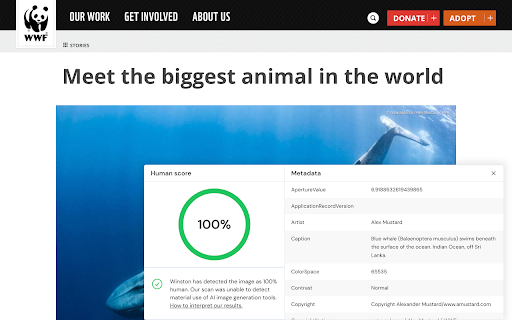
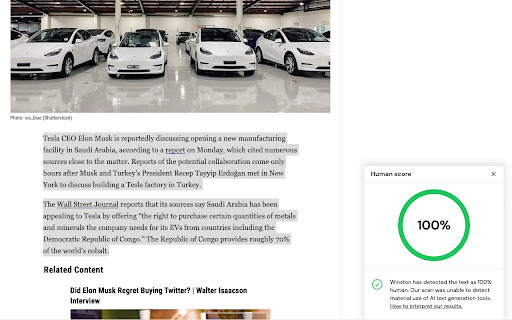
Winston AI is the most trusted AI detector to help identify AI generated content and AI images.
The most trusted AI detector is now available wherever you go.
Winston AI allows you to accurately detect if any text or image is generated with an AI tool.
Our AI writing checker is used by hundreds of thousands of users and is the solution trusted by the largest publishers and institutions around the world.
Our AI image detector is able to identify with remarkable accuracy images generated by Midjourney, DALL-E, Stable Diffusion and more. Our assessment includes a complete digital forensics analysis, including C2PA and IPTC watermarks, and full Exif details to help identify AI-generated images and assess their origins accurately.
With our Chrome Plugin, you can now instantly scan any content or images for AI directly on the webpages by highlighting and-or right clicking on the text or image. For maximum privacy, scans using the Chrome extension are not saved anywhere.
Winston AI key features:
?Industry leading accuracy in detecting AI content (99.98%)
?Detects AI writing from all known AI writing tools including ChatGPT
?Detects AI writing from all known AI writing tools including Midjourney
?Scan content directly on the web page
?Multilingual: works with content in English, French, Spanish, German, Portuguese and Dutch. More languages are coming soon!
How to use it:
✅ Click on the “add to chrome” button to add the Chrome extension.
✅ Pin the extension to your browser by clicking on the puzzle icon in the top right of your browser, then clicking on the pin icon next to the Winston AI chrome extension.
✅ Create a free account on Winston AI (https://app.gowinston.ai/register) - No credit card required.
✅ Click on the Winston AI logo (blue "W" on white circle) in your extension toolbar.
✅ Click on the "Login" button. If you are not logged in to the website, you will be prompted to log in with your credentials.
✅ Click on the Winston AI logo (blue "W" on white circle) to view your credits.
✅ Highlight any content (min. 500 characters) or image directly on any website and right click on it.
✅ Click on “scan for AI content” or “Scan image for AI’.
✅ Each word scanned requires one credit, image scans require 300 credits.
✅ Your score and assessment will be displayed on the bottom right corner of your browser, along with the complete forensics analysis of your image including metadata (when applicable).
| 分类 | 🛠️工具 |
| 插件标识 | cdbldfdikpkmfcnpidikieafacjkchbg |
| 平台 | Chrome |
| 评分 |
★★★★☆
4.9
|
| 评分人数 | 57 |
| 插件主页 | https://chromewebstore.google.com/detail/ai-detector-for-text-and/cdbldfdikpkmfcnpidikieafacjkchbg |
| 版本号 | 0.0.0.5 |
| 大小 | 96.44KiB |
| 官网下载次数 | 10000 |
| 下载地址 | |
| 更新时间 | 2024-05-02 00:00:00 |
CRX扩展文件安装方法
第1步: 打开Chrome浏览器的扩展程序
第2步:
在地址栏输入: chrome://extensions/
第3步: 开启右上角的【开发者模式】
第4步: 重启Chrome浏览器 (重要操作)
第5步: 重新打开扩展程序管理界面
第6步: 将下载的crx文件直接拖入页面完成安装
注意:请确保使用最新版本的Chrome浏览器
同类插件推荐

WriteMe.ai - AI powered writing assistant
Best AI Writer, Content Generator & Writing As

AI Content Detector - Copyleaks
Verify what content was written by a human or an A

AI Detector for text and images - Winston AI
Winston AI is the most trusted AI detector to help

Hive AI Detector
Check if text, images, audio or videos are AI gene