
NetSuite Field Explorer Chrome 插件, crx 扩展下载
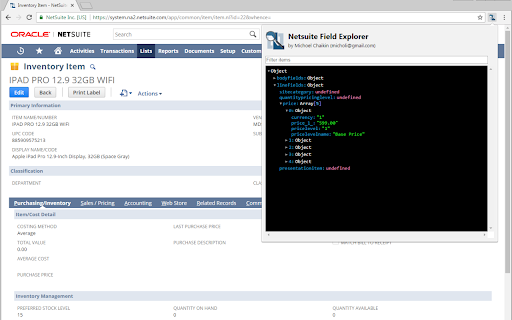
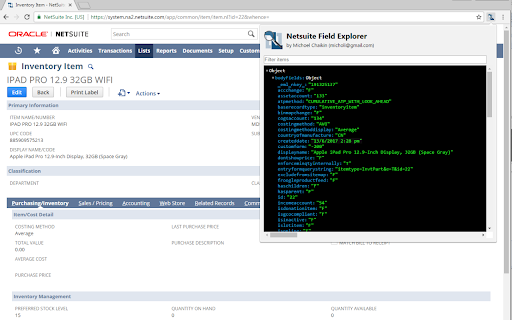
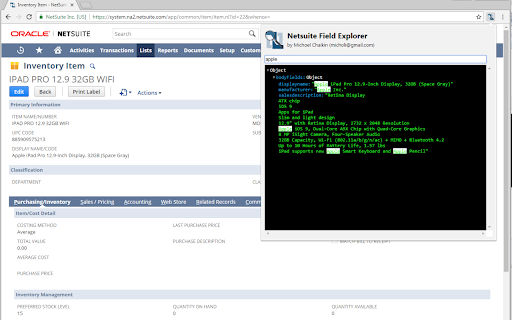
Examine the fields in a Netsuite record
NetSuite Field Explorer is a Chrome extension to help NetSuite developers and administrators examine the data model behind NetSuite records. It provides an easily accessible and visually attractive interface to display the currently viewed record with field names and a convenient search box.
Features:
- One click access to see the field names for NetSuite record fields
- Colorful tree viewer
- Quick filtering / search
- Shows fields that don't come up using the "&xml=T" URL trick
| 分类 | 💻开发者工具 |
| 插件标识 | cekalaapeajnlhphgdpmngmollojdfnd |
| 平台 | Chrome |
| 评分 |
★★★★★
5
|
| 评分人数 | 1 |
| 插件主页 | https://chromewebstore.google.com/detail/netsuite-field-explorer/cekalaapeajnlhphgdpmngmollojdfnd |
| 版本号 | 1.0.0 |
| 大小 | 65.3KiB |
| 官网下载次数 | 30000 |
| 下载地址 | |
| 更新时间 | 2024-08-08 00:00:00 |
CRX扩展文件安装方法
第1步: 打开Chrome浏览器的扩展程序
第2步:
在地址栏输入: chrome://extensions/
第3步: 开启右上角的【开发者模式】
第4步: 重启Chrome浏览器 (重要操作)
第5步: 重新打开扩展程序管理界面
第6步: 将下载的crx文件直接拖入页面完成安装
注意:请确保使用最新版本的Chrome浏览器
同类插件推荐

NetSuite Helper for Your Works
This extension helps to speed up the normal use of

Show Netsuite Field IDs
Hover over NetSuite fields to show their IDs. Find

NetSuite Record JSON Viewer
This extension will stringify the current NetSuite

NetSuite Utils
NetSuite Utility ExtensionThis started as group of

NetSuite Transaction Tree
Netsuite Transaction Tree Browser By Waleed Bin Kh

NetSuite: Show Field IDs
Hover over NetSuite fields to show their IDs. Find

Quick Access for NetSuite
This extension provides quick access to NetSuite t

NetSuite Scripted Records
See the customizations deployed to your recordsWou

NetSuite: Saved Search and Dataset Export
Export your saved searches, datasets and workbooks
NetSuite Field Explorer
Examine the fields in a Netsuite recordNetSuite Fi

NetSuite Field Finder
Allows user to quickly find fields in Saved Search

NetSuite Advanced Field Help
Extends the NetSuite Field Help and adds relevant

NetSuite: HTML Script Notes
Add HTML elements and styles to your script notes.