
Save GPT Chrome 插件, crx 扩展下载


Save Chat GPT Commands & Unlock More Chat GPT Features
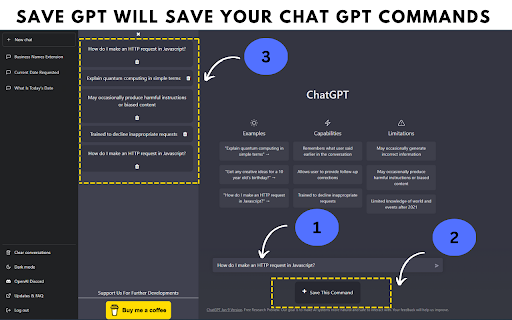
Save GPT chrome extension especially made for users who use chat GPT frequently. In Chat GPT there is no option to save your frequently chat GPT commands, so you have to manually type the same command again and again which is so much annoying. This save GPT chrome extension will fill that gap for you. This chrome extension will allow you to,
FREE FEATURES:
✓ Save frequently use chat GPT commands your own way, as a template.
✓ Store them even if you closed the chrome extension.
✓ One click added, not manually type is required.
PREMIUM FEATURES:
(visit our site for more info about new features)
✓ Scroll To Pinned Message.
✓ Special Prompt Access (developing).
✓ Copy Single Messages At One Click.
✓ Download Full Chat As Text File.
✓ Turn Your Chat GPT Messages Into Real Voices.
✓ Voice Typing Enabled.
✓ Early Access To Upcoming Features.
THIS IS JUST A BEGINING ! STAY TUNED FOR MORE EXCITING FEATURES.
Note: All data will be lost, if you remove the chrome extension from chrome browser. So don't remove.
If you think this chrome extension is helpful, please leave a review. Also, you can do any donations for further developments of this chrome extension. Your support would be highly appreciated.
Thanks,
Save GPT Team.
| 分类 | 📝工作流程与规划 |
| 插件标识 | ckponohnnpllckgogckkkoeemokgfnne |
| 平台 | Chrome |
| 评分 |
★★★★☆
4.6
|
| 评分人数 | 460 |
| 插件主页 | https://chromewebstore.google.com/detail/save-gpt/ckponohnnpllckgogckkkoeemokgfnne |
| 版本号 | 1.0.5 |
| 大小 | 815KiB |
| 官网下载次数 | 1000 |
| 下载地址 | |
| 更新时间 | 2023-03-17 00:00:00 |
CRX扩展文件安装方法
第1步: 打开Chrome浏览器的扩展程序
第2步:
在地址栏输入: chrome://extensions/
第3步: 开启右上角的【开发者模式】
第4步: 重启Chrome浏览器 (重要操作)
第5步: 重新打开扩展程序管理界面
第6步: 将下载的crx文件直接拖入页面完成安装
注意:请确保使用最新版本的Chrome浏览器
同类插件推荐

Save GPT
Save Chat GPT Commands & Unlock More Chat GPT

保存 ChatGPT DALL·E-3 对话记录到 Notion
一键保存 ChatGPT 对话到 Notion。导出 ChatGPT 对话ChatGPT保存到Not
ChatGPT Prompts Manager Extension
ChatGPT Prompts Manager ExtensionA user-friendly C
Pinnable ChatGPT:在侧边栏中钉选 GPT 对话
在侧边栏中钉选 ChatGPT 对话以便快速访问置顶对话将始终保持在顶部,便于快速访问。 Pinn