
Youtube RSS Chrome 插件, crx 扩展下载
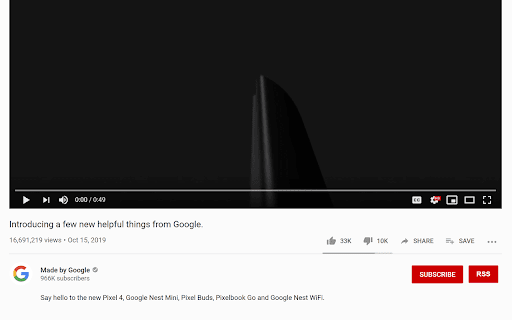
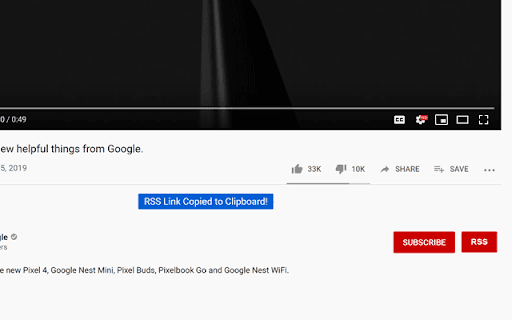
This plugin adds the RSS button back to Youtube.
Simply add the extension to your browser, click the RSS button, and paste the link into your RSS Reader. The link is copied to the clipboard when clicked.
Youtube occasionally changes how the site works, so if the plugin is broken PLEASE contact me and I can work on a fix. Or create an issue on github.
If you have any issues, report them on the GitHub Repo.
| 分类 | 📝工作流程与规划 |
| 插件标识 | cmkhdimgaondkfghelifknnpicdajeim |
| 平台 | Chrome |
| 评分 |
★★★☆☆
3.9
|
| 评分人数 | 8 |
| 插件主页 | https://chromewebstore.google.com/detail/youtube-rss/cmkhdimgaondkfghelifknnpicdajeim |
| 版本号 | 1.0.7 |
| 大小 | 126KiB |
| 官网下载次数 | 484 |
| 下载地址 | |
| 更新时间 | 2022-10-31 00:00:00 |
CRX扩展文件安装方法
第1步: 打开Chrome浏览器的扩展程序
第2步:
在地址栏输入: chrome://extensions/
第3步: 开启右上角的【开发者模式】
第4步: 重启Chrome浏览器 (重要操作)
第5步: 重新打开扩展程序管理界面
第6步: 将下载的crx文件直接拖入页面完成安装
注意:请确保使用最新版本的Chrome浏览器
同类插件推荐

Youtube RSS
This plugin adds the RSS button back to Youtube.Si

YouTube Subscriptions Exporter
== This extension cannot export more than 1000 sub

VideoFeed for YouTube™
Extension for Google Chrome™, shows the newest vid

Erinome RSS
RSS reader, a modded port of 'Smart RSS' f

Smart RSS
RSS ReaderSmart RSS allows you to follow new posts

RSS Finder
Lists RSS and Atom feeds available on the current

Get RSS Feed URL
Retreive RSS feeds URLs from WebsiteProvides links

FeedPop - RSS阅读器
简便快捷地订阅RSS。使用FeedPop,在扩展程序的弹出窗口中订阅RSS。 功能特点: ● 无需

QFeeds
Reader of RSS feeds* Local storage is used to keep

FeedBundle - Online RSS News Reader
Make your own collection of feeds, organize and re

RSS Feed Finder
Retreive/Find RSS feeds from WebsitesGet a simple

Feedbro
Advanced Feed Reader - Read news & blogs or an