
My Kindle Highlights Chrome 插件, crx 扩展下载
My Kindle Highlights
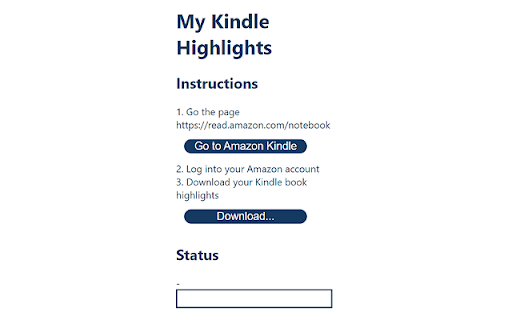
After the user logs in to the Amazon Kindle page, this extension will parse the webpage in order to identify the Kindle books that have highlights made by the user and export the highlights with the book details into a JSON file. The user is then offered the option to save this file locally.
| 分类 | 📝工作流程与规划 |
| 插件标识 | codbcfademkhlblegiocccpaimimhkih |
| 平台 | Chrome |
| 评分 |
★★★★☆
4
|
| 评分人数 | 2 |
| 插件主页 | https://chromewebstore.google.com/detail/my-kindle-highlights/codbcfademkhlblegiocccpaimimhkih |
| 版本号 | 2.0 |
| 大小 | 22.42KiB |
| 官网下载次数 | 108 |
| 下载地址 | |
| 更新时间 | 2021-05-06 00:00:00 |
CRX扩展文件安装方法
第1步: 打开Chrome浏览器的扩展程序
第2步:
在地址栏输入: chrome://extensions/
第3步: 开启右上角的【开发者模式】
第4步: 重启Chrome浏览器 (重要操作)
第5步: 重新打开扩展程序管理界面
第6步: 将下载的crx文件直接拖入页面完成安装
注意:请确保使用最新版本的Chrome浏览器
同类插件推荐

Kindle Notes Exporter
A chrome plugin that export kindle notes to a noti
Send web articles to Kindle by KTool
Send web articles, Twitter threads, RSS and newsle

Note Extractor for Kindle
Note Extractor makes it easy to export your Kindle

Kindle Highlights
Resurface your Kindle highlights and remember what

Send to Kindle
Push news articles, blogs posts and other web cont

Kindle Highlight Extractor
A simple tool for you to export kindle highlightsV

Export Kindle Highlights to Notion V2 (2023)
Export Kindle Highlights and clippings to Notion e

Kindle Highlights to Readsmart
Sync all your Kindle highlights automatically usin

Sort by random: shuffle lists
Randomize the order of items in a given listRandom
My Kindle Highlights
My Kindle HighlightsAfter the user logs in to the

Push to Kindle
Send web articles to your KindleImprove your readi

Eloquent: Quick Capture and Highlighting
Eloquent is an intelligent personal knowledge mana

Obsidian Clipper
A small chrome plugin that let's you easily cl