
Chrome Command Bar Chrome 插件, crx 扩展下载
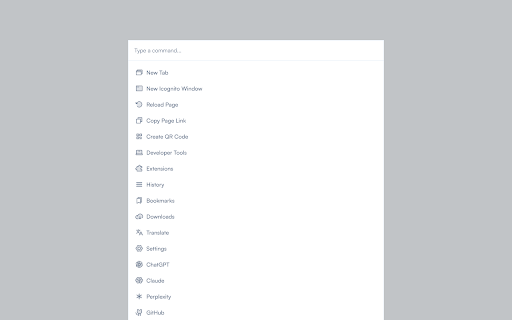
Navigate your browser like a pro with just a few clicks.
Chrome Command Bar is designed to enhance your productivity and streamline your browsing experience.
With just a few keystrokes (Ctrl+K or Cmd+K on Mac), you can access a wide range of browser functions and popular websites.
Navigate through the command list and hit Enter to execute your chosen action, all without touching your mouse.
Whether you need to open a new tab or incognito window, access browser settings or developer tools, or visit your favourite websites like GitHub, ChatGPT, Claude, Perplexity, or YouTube, everything is just a Cmd+K away.
How It Works
a. Install the Chrome Command Bar extension.
b. Press Ctrl+K (or Cmd+K on Mac) to open the command palette.
c. Start typing to filter the command list.
d. Use the arrow keys to navigate and Enter to execute a command.
| 分类 | 🛠️工具 |
| 插件标识 | coeabcfopmadgjffgjgpfldnmhgjkmml |
| 平台 | Chrome |
| 评分 |
★★★★☆
4.5
|
| 评分人数 | 41 |
| 插件主页 | https://chromewebstore.google.com/detail/chrome-command-bar/coeabcfopmadgjffgjgpfldnmhgjkmml |
| 版本号 | 1.1 |
| 大小 | 46.96KiB |
| 官网下载次数 | 26 |
| 下载地址 | |
| 更新时间 | 2024-08-05 00:00:00 |
CRX扩展文件安装方法
第1步: 打开Chrome浏览器的扩展程序
第2步:
在地址栏输入: chrome://extensions/
第3步: 开启右上角的【开发者模式】
第4步: 重启Chrome浏览器 (重要操作)
第5步: 重新打开扩展程序管理界面
第6步: 将下载的crx文件直接拖入页面完成安装
注意:请确保使用最新版本的Chrome浏览器
同类插件推荐
Chrome Command Bar
Navigate your browser like a pro with just a few c
Custom Scrollbar
Custom Scrollbar is a Chrome extension that allows

Cool Cursors - Custom Cursor for Chrome
Customize your experience of using the Chrome brow

Dualless for Google Chrome™
Just a simple click to arrange your browsers side