
Favitabs Chrome 插件, crx 扩展下载
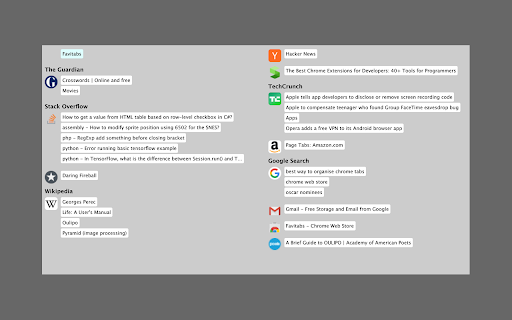
Organise tabs by favicon, navigate them with mouse or keyboard
Are you fed up with having so many tabs and never being able to find the right one? Do end up with many duplicate tabs as a result? Favitabs shows all your tabs at a glance, organised by favicon and title. It works both as a replacement for the new tab page and as a pop-up which you can set to whatever key combination you like. It also lets you quickly search for tabs by title and navigate them using the keyboard.
Favitabs does not request unnecessary permissions and does not have access to page content. It does not spy on you and send information to any server. It does not include any ads.
| 分类 | 📝工作流程与规划 |
| 插件标识 | cooeblelamnaioffbochepdnmminogdg |
| 平台 | Chrome |
| 评分 |
★★★☆☆
3.7
|
| 评分人数 | 207 |
| 插件主页 | https://chromewebstore.google.com/detail/favitabs/cooeblelamnaioffbochepdnmminogdg |
| 版本号 | 1.2 |
| 大小 | 11.1KiB |
| 官网下载次数 | 4000 |
| 下载地址 | |
| 更新时间 | 2024-05-24 00:00:00 |
CRX扩展文件安装方法
第1步: 打开Chrome浏览器的扩展程序
第2步:
在地址栏输入: chrome://extensions/
第3步: 开启右上角的【开发者模式】
第4步: 重启Chrome浏览器 (重要操作)
第5步: 重新打开扩展程序管理界面
第6步: 将下载的crx文件直接拖入页面完成安装
注意:请确保使用最新版本的Chrome浏览器
同类插件推荐

Chromite Butler
Meant to be useful to chromium developers (for bui

TabNest
Save multiple tabs for later and reopen them with

Google Calendar Guests Modify Event Default
Enables 'Guests can modify event' setting
Favitabs
Organise tabs by favicon, navigate them with mouse

FavIdenticon for Google Docs
Gives Docs, Sheets, and Slides unique favicons per
Camera Pan Tilt Zoom
Control camera pan, tilt, and zoomControl camera p
Windows Manager for Google Chrome™
Allows to tile Chrome™ windows and emulate workspa

Link to Text Fragment
Browser extension that allows for linking to arbit

Unique Tabs
Upon opening a new tab or navigating to a new page

Close Duplicate Tab
Close tabs which are duplicated. Only tabs with ex
Clutter Free - Prevent duplicate tabs
Reduce tab clutter - prevent duplicate tabs, quick

Tabs Outliner
The Next Generation Session Manager; A Really Work

Quick Tabs
A keyboard centric most recently used (MRU) ordere