
KhanHack Chrome 插件, crx 扩展下载
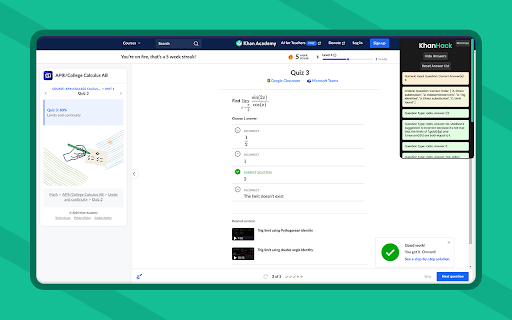
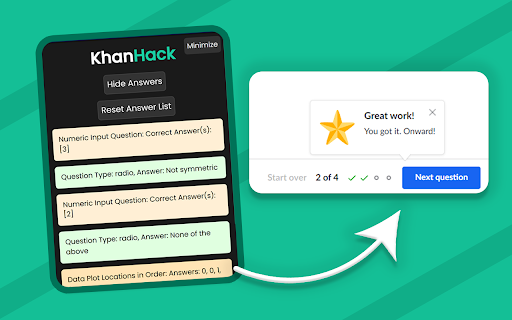
The KhanHack Extension Used To View All Answers Easily!
Introducing the KhanHack, an extension which shows you the answers to lessons and any type of quiz on the official non-affiliated Khan Academy® website, its simplistic UI design lets you clearly see the answers to problems and cheat without having to actually do the problems and quizzes at all. This extension works by grabbing the answers that are sent from the server and putting them on the awesome interface for you to see!
How to use:
1. Simply install the extension.
2. Purchase the cheap subscription.
3. Go to any assignment and the hack/cheat script will activate.
4. Then the KhanHack will display all of the quiz answers in the top right hack menu.
5. Have fun flying though your lessons!!! ✌️
Note: The KhanHack will not work if you are already in a lesson and you choose to activate it, if you do you must reload the page and activate it then before you get into any lessons or quizzes. Also the answers are displayed in proceeding order so you may have to sort through the whole quiz's answers to find the one for your question.
If you have any issues feel free to contact the developers in the KhanHack Discord -> (https://discord.gg/N5SCTJ8wm6)
Disclaimer: KhanHack is an unofficial tool and is not endorsed by or affiliated with any educational institution, including Khan Academy™. All trademarks belong to their respective owners. Khan Academy™ is a trademark of Khan Academy® Inc.
| 分类 | 🛠️工具 |
| 插件标识 | daodbmeffhdfmdchlkenoompiebllpma |
| 平台 | Chrome |
| 评分 |
★★★★☆
4.7
|
| 评分人数 | 1239 |
| 插件主页 | https://chromewebstore.google.com/detail/khanhack/daodbmeffhdfmdchlkenoompiebllpma |
| 版本号 | 1.8.3 |
| 大小 | 35.71KiB |
| 官网下载次数 | 2000 |
| 下载地址 | |
| 更新时间 | 2024-09-11 00:00:00 |
CRX扩展文件安装方法
第1步: 打开Chrome浏览器的扩展程序
第2步:
在地址栏输入: chrome://extensions/
第3步: 开启右上角的【开发者模式】
第4步: 重启Chrome浏览器 (重要操作)
第5步: 重新打开扩展程序管理界面
第6步: 将下载的crx文件直接拖入页面完成安装
注意:请确保使用最新版本的Chrome浏览器
同类插件推荐

Extension for Khan Academy
A Browser Extension for Khan Academy that adds mor

Khan Academy Helper
Opens Amara page for translating currently opened

KhanHack
A Khan Academy Hack, 100% freeKhan Academy Answer
SawKhan
The perfect assignment assistant!SawKhan provides
KhanHack
The KhanHack Extension Used To View All Answers Ea

School Cheats
Side by side scripts to help whilst working with s
EasyKahoot
Get the answers to any Kahoot quiz in seconds.Easy
KahootGPT | AI Integration (NEW: ChatGPT 4o)
Not affiliated with Kahoot! or ChatGPT: Use Kahoot

Khan Academy Completionist
GG, well learned.Track your math progress in Khan

Khan Academy Notifications
Enhance your Khan Academy experience with timely n

QuestionAI
AI Copilot 可以回答截图查询并协助写作、总结、翻译和语法检查。您的QuestionAI,由

Quizlet Hacker
Automatically completes every quizlet activity!Aut
Blooket Hacker
Helps you win your Blooket game! Created by Llama