
replyai.app - AI for emails Chrome 插件, crx 扩展下载

AI assisted email replies for gmail
Helps gmail users write email replies extremely fast using AI.
How it works:
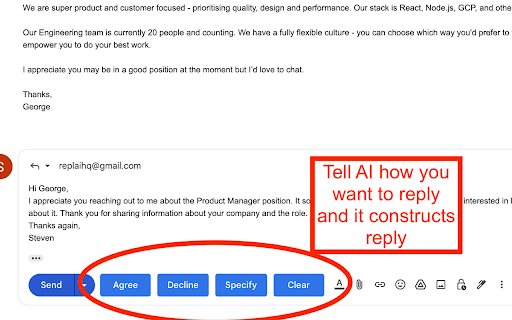
When you compose a reply to an email 4 buttons ("Agree", "Decline", "Specify", "Clear") are added next to the "Send" button that you can use as shown in the screenshot.
"Clear" only cleans the response, whereas the other 3 are used as inputs to the AI.
When you click "Agree" we feed the AI with the contents of the email and tell it to write a response that agrees to it.
When you click "Decline" we feed the AI with the contents of the email and tell it to write a response that declines to it.
For "Specify" you need to write a text in the response field of how you want the AI to reply. e.g. "schedule call tomorrow at 17:00", or "decline in a funny way". Then we feed the AI with the contents of the email and how you specified the answer to be and AI writes a response.
| 分类 | 📝工作流程与规划 |
| 插件标识 | dbdbfkaihieniemdbonidjemkfhoiioc |
| 平台 | Chrome |
| 评分 |
★★★★☆
4.9
|
| 评分人数 | 8942 |
| 插件主页 | https://chromewebstore.google.com/detail/replyaiapp-ai-for-emails/dbdbfkaihieniemdbonidjemkfhoiioc |
| 版本号 | 0.2 |
| 大小 | 76.46MiB |
| 官网下载次数 | 588 |
| 下载地址 | |
| 更新时间 | 2022-12-14 00:00:00 |
CRX扩展文件安装方法
第1步: 打开Chrome浏览器的扩展程序
第2步:
在地址栏输入: chrome://extensions/
第3步: 开启右上角的【开发者模式】
第4步: 重启Chrome浏览器 (重要操作)
第5步: 重新打开扩展程序管理界面
第6步: 将下载的crx文件直接拖入页面完成安装
注意:请确保使用最新版本的Chrome浏览器
同类插件推荐

MailMaestro - Gmail AI assistant
Get to Inbox Zero in no time with AI. Write, reply
replyai.app - AI for emails
AI assisted email replies for gmailHelps gmail use

Scribbly AI: ChatGPT Email Assistant
Scribbly – AI-powered email writing for busy profe

GMPlus - OpenAI ChatGPT For Email: ChatGPT 中文
Display ChatGPT response as a suggestion to comple