
Hotstar Party plus Chrome 插件, crx 扩展下载

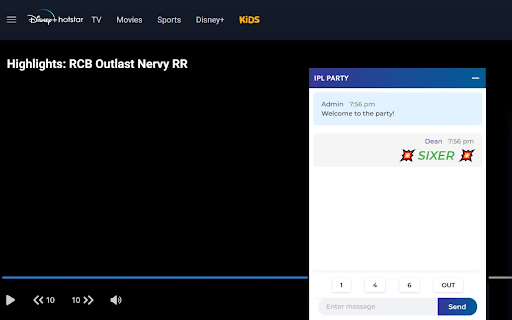
Chat and party with your friends while watching your favorite movie, TV show, IPL and more
Watching movies, Sports and Live Shows on Hotstar is fun. To make it more interesting watch your favorite show on Hotstar with your loved ones together. To make this possible we introduce you the Hotstar Party Plus extension.
How to use Hotstar Party Plus:
# Install the extension on your device and open the hotstar webpage and Navigate to your favorite show or live matche.
# Click on the HP+(Hotstar Party Plus) extension icon on the top.
# Click on Start Party and a link will be generated.
# Share the link to your loved ones.
# Any one can join the party by clicking on the url which you shared.
NOTE: Make sure all other people who wants join the party should also have this extension on their device.
Disney+ Hotstar Platform ("Platform" or the "Disney+ Hotstar Service, which includes all the features available on the Platform is a trademark of The Walt Disney Company") and this extension is not related to the official hotstar app or company.
Upcoming Features:
#Live video Sync
| 分类 | 🎉趣味休闲 |
| 插件标识 | dbgeaipmohdmannhcnajneofiiopnpdm |
| 平台 | Chrome |
| 评分 |
★★★☆☆
3.6
|
| 评分人数 | 156 |
| 插件主页 | https://chromewebstore.google.com/detail/hotstar-party-plus/dbgeaipmohdmannhcnajneofiiopnpdm |
| 版本号 | 0.1 |
| 大小 | 87.14KiB |
| 官网下载次数 | 271 |
| 下载地址 | |
| 更新时间 | 2022-03-23 00:00:00 |
CRX扩展文件安装方法
第1步: 打开Chrome浏览器的扩展程序
第2步:
在地址栏输入: chrome://extensions/
第3步: 开启右上角的【开发者模式】
第4步: 重启Chrome浏览器 (重要操作)
第5步: 重新打开扩展程序管理界面
第6步: 将下载的crx文件直接拖入页面完成安装
注意:请确保使用最新版本的Chrome浏览器
同类插件推荐

Hotstar Party
Watch Hotstar remotely with friendsA chrome extens

DPlus Party - Disney Plus Watch Party
Watch Disney+ (Disney Plus) together anywhere, any

Hotstar Party
Watch Disney plus hotstar videos in sync with frie

Disney Party - Watch Party
Watch Disney+ hotstar videos in sync with friends

Disney+ Party
Watch Disney Plus togetherDo you miss group movie

Hotstar Party plus
Chat and party with your friends while watching yo

Prime Party Extended
Watch Amazon Prime Video with friends! New feature

YouTube派对
与朋友同步您的YouTube视频播放与朋友一起观看YouTube视频。 YouTube Party是

Flickcall: Netflix Party with Video Call
Create watch party on Netflix, Jiocinema, Hotstar,

Watch Party
Watch Netflix and Disney+ with your friends!TV is

Jelly Party
Watch videos with your friends — in sync!Watch tog

Hotstar Party
Sync and watch Hotstar videos with friends!With Ho

Enhanced Disney+ Hotstar
Enhancing Disney+ Hotstar features for a better wa