
Fantasy Football Ticker: Yahoo, ESPN, Sleeper Chrome 插件, crx 扩展下载
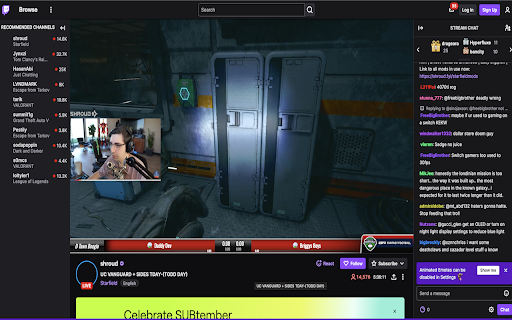
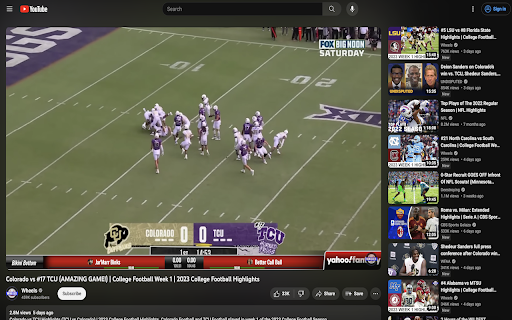
An extension to overlay live score updates from all your fantasy teams on live streams and videos.
Elevate your fantasy football experience to a whole new level with the Fantasy Football Ticker Chrome extension! Stay connected to your fantasy teams and players while streaming the games or enjoying videos on YouTube, YouTube TV, Twitch, Amazon Prime, NFL.com, ESPN, and other streaming platforms! Integrates seamlessly with Yahoo, ESPN, and Sleeper fantasy!
Key Features:
? Live Score Updates: Get real-time score updates for your fantasy football teams right on your screen. No need to constantly check your fantasy app or website.
? Seamless Integration: Our extension seamlessly overlays score updates on top of videos you watch, ensuring you never miss a moment of the action.
? Wide Compatibility: Supports Yahoo Fantasy, ESPN Fantasy, Sleeper, as well as popular video streaming platforms including YouTube, Twitch, Amazon Prime, YouTube TV, NFL.com, and ESPN.
? Easy to Use: The extension is easy to install and even easier to use. Simply install it, import your teams from your fantasy providers, and let the updates roll in as you enjoy your favorite content.
⚙️ Customizable: Tailor the ticker to your preferences. Choose which leagues and teams to track, so you see only the updates that matter most to you.
? Enhance Your Fantasy Experience: Whether you're watching game highlights, following live streams, or enjoying football-related content, our Fantasy Football Ticker keeps you informed and engaged.
Never be out of the loop when it comes to your fantasy football teams. Download our Fantasy Football Ticker extension today and elevate your fantasy gaming experience like never before!
| 分类 | 🎉趣味休闲 |
| 插件标识 | dbhhoddpcmjohmmfjdiaingjfgmpieog |
| 平台 | Chrome |
| 评分 |
★★★★☆
4
|
| 评分人数 | 1 |
| 插件主页 | https://chromewebstore.google.com/detail/fantasy-football-ticker-y/dbhhoddpcmjohmmfjdiaingjfgmpieog |
| 版本号 | 0.1.5 |
| 大小 | 267KiB |
| 官网下载次数 | 111 |
| 下载地址 | |
| 更新时间 | 2023-10-15 00:00:00 |
CRX扩展文件安装方法
第1步: 打开Chrome浏览器的扩展程序
第2步:
在地址栏输入: chrome://extensions/
第3步: 开启右上角的【开发者模式】
第4步: 重启Chrome浏览器 (重要操作)
第5步: 重新打开扩展程序管理界面
第6步: 将下载的crx文件直接拖入页面完成安装
注意:请确保使用最新版本的Chrome浏览器
同类插件推荐

NFL Stream
Assistant for nflstream.web.app: allows fetching o

ESPN NFL Score Hider
Hides the scores of NFL games for certain teams un

Sleeper.com Matchup Extension
Sleeper Fantasy ExtensionA Sleeper.com Fantasy Foo

Sleeper Enhancement
Improves features of the Sleeper Fantasy Football

NFL实时中心:比分、数据和球迷聊天
NFL实时中心:一款扩展程序,实时提供NFL比分、数据、比赛回顾、排名和球迷聊天。您的终极 NFL
Fantasy Football Ticker: Yahoo, ESPN, Sleeper
An extension to overlay live score updates from al

Twitter View Count Remover
A chrome extension to remove the Views count from

Carload Controller
Carload extension monitoring systemI use this exte

Smiley Ogame
Smiley for Ogame ChatEN __________________________

NTUCal
Add your NTU modules to your favourite calendar to

Accessibility Checker for GitHub Markdown
Highlight accessibility issues as you write Markdo

GitHub PR images comparer
Enhanced GitHub PR images comparer that uses pixel