
WiseFax Chrome 插件, crx 扩展下载
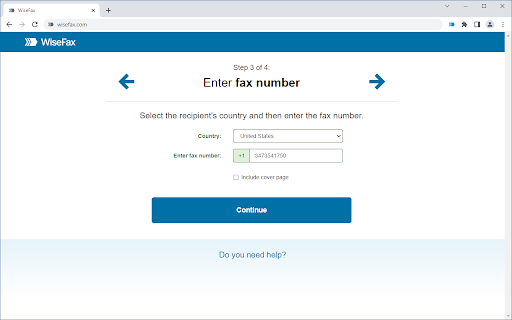
WiseFax enables you to send fax from Chrome to any fax number in the world.
Wisefax – send fax quickly and easily
Sending fax with WiseFax was never so quick and easy. You only need internet connection on your device. Send fax in four simple steps from Chrome. Pay as you go, with no monthly or yearly subscription and send fax anywhere in the world.
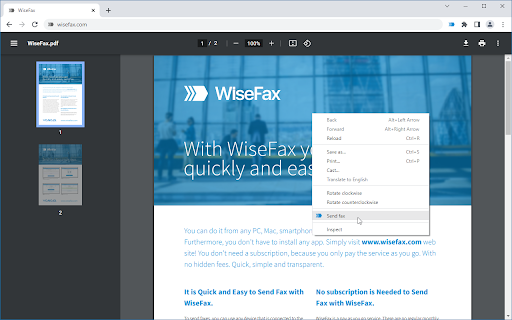
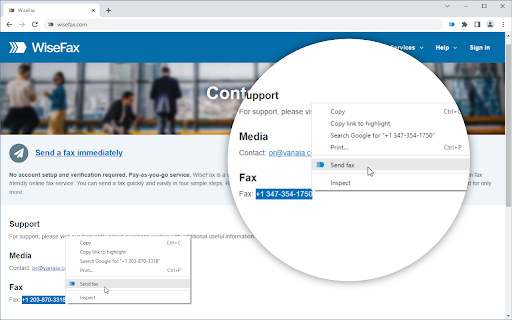
With WiseFax extension, you can easily fax an opened online PDF document from Chrome, or an image that is part of a website, by right-clicking anywhere on its content and selecting "Send fax" menu option. Similarly, you can select fax number that is part of a website text and send fax to that number by selecting "Send fax" menu.
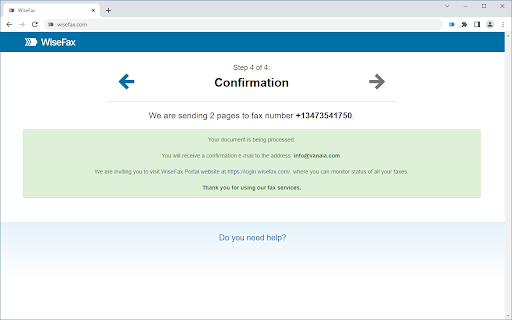
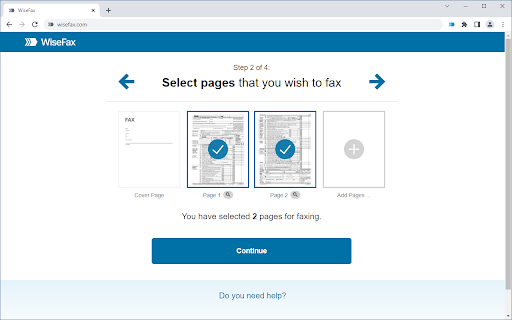
WiseFax supports numerous document and file formats such as PDF documents, Microsoft Office, OpenOffice and LibreOffice documents and spreadsheets, Hancom Hangul documents, ScanWritr documents, and JPEG, GIF, PNG, BMP, HEIC images. You can also import a picture and send it directly to fax. When doing so, WiseFax efficiently detects edges of your document using advanced edge detection algorithm and makes picture clearer with picture enhancement algorithm. This makes scanning easier and fax more readable. You can easily select which pages you want to fax. Displayed preview of the pages will look the same as they will come out on fax at recipient side. Type fax number and wait for response. If it was successful or no you will get an email notification.
Sending fax with WiseFax is as simple as that. Try it, you’ll like it.
Four easy steps of how to send fax with WiseFax are:
1.) Upload your existing document or picture.
2.) Click and select / deselect pages you want to send to fax and check them on screen as you already see them as they will come out on fax.
3.) Select among 240 countries where you want to send your fax and type fax number.
4.) Authenticate with your existing account on Facebook, Google, Windows Live and Vanaia or create a new one. Buy fax token, if you already didn’t do so, and send fax. Wait for fax status confirmation which you ‘ll receive to provided e-mail.
| 分类 | 📝工作流程与规划 |
| 插件标识 | dcfnidhjmhjocklccgbdepcdiojdhngb |
| 平台 | Chrome |
| 评分 |
★★★☆☆
3.1
|
| 评分人数 | 24 |
| 插件主页 | https://chromewebstore.google.com/detail/wisefax/dcfnidhjmhjocklccgbdepcdiojdhngb |
| 版本号 | 1.5 |
| 大小 | 13.74KiB |
| 官网下载次数 | 8000 |
| 下载地址 | |
| 更新时间 | 2022-06-30 00:00:00 |
CRX扩展文件安装方法
第1步: 打开Chrome浏览器的扩展程序
第2步:
在地址栏输入: chrome://extensions/
第3步: 开启右上角的【开发者模式】
第4步: 重启Chrome浏览器 (重要操作)
第5步: 重新打开扩展程序管理界面
第6步: 将下载的crx文件直接拖入页面完成安装
注意:请确保使用最新版本的Chrome浏览器
同类插件推荐

WiseFax
WiseFax enables you to send fax from Chrome to any

Faxjar - Send a fax now (no ads or signups)
Send a fax online right inside your web browserFax

Fax.Plus - 在线接收和发送传真
Fax.Plus是一种安全的在线传真服务,用于接收和发送来自计算机和移动设备的传真。 (免费试用)使
CocoFax-发送和接收传真(免费试用)
CocoFax使您可以从计算机,手机,电子邮件(Gmail),Google云端硬盘,文档,表格等在线

Fill: Edit, Sign, Send, Store and Print PDF's
Fill makes it simple to complete PDF forms. Sign d
signNow - Sign and Fill PDF & Word Documents
Sign PDF and Word documents from the web by clicki

Free SMS, Fax Receiver
This extension allows you to use our free phone nu

Google Voice (by Google)
Make calls with Google Voice with a click.Extensio
Docusign eSignature Chrome 浏览器版
随时在 Chrome 中访问 Docusign eSignature。无论您是在网上购物、浏览网页,

DocHub - Sign PDF from Gmail
Sign and edit PDF documentsSign, edit, and share P

Send Fax from Gmail by no Open Gmail
provides a button which allows you to send a webpa

Save Emails to Drive by cloudHQ
一键将任何 Gmail 电子邮件保存到 Google 云端硬盘。自动保存标签中的所有电子邮件。多种导