
Enable Backspace Chrome 插件, crx 扩展下载
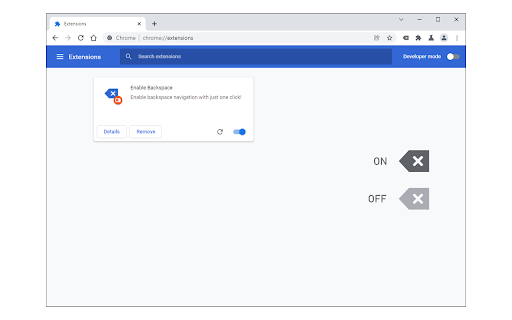
Enable backspace navigation with just one click!
Enable Backspace extension enables you to easily navigate to the previous page by clicking on the "backspace" button on your keyboard.
Recently in modern browsers, the "go-back" feature for the backspace button was removed. This add-on helps you bring back this functionality to your browser. It has a toolbar icon that serves as the toggle switch. Once the add-on is active, the toolbar icon color is dark grey. In the inactive state, the icon color changes to light grey. Please note that this add-on does not have any options or settings page. Simply add it to your browser and start using it.
If you have a feature request or found a bug to report, please submit the bug report form on the addon's homepage (https://mybrowseraddon.com/enable-backspace.html).
| 分类 | 🛠️工具 |
| 插件标识 | ddijblnjiploanefjnbpimgbfjkpifia |
| 平台 | Chrome |
| 评分 |
★★★★☆
4
|
| 评分人数 | 4 |
| 插件主页 | https://chromewebstore.google.com/detail/enable-backspace/ddijblnjiploanefjnbpimgbfjkpifia |
| 版本号 | 0.1.3 |
| 大小 | 26.79KiB |
| 官网下载次数 | 4000 |
| 下载地址 | |
| 更新时间 | 2024-11-28 00:00:00 |
CRX扩展文件安装方法
第1步: 打开Chrome浏览器的扩展程序
第2步:
在地址栏输入: chrome://extensions/
第3步: 开启右上角的【开发者模式】
第4步: 重启Chrome浏览器 (重要操作)
第5步: 重新打开扩展程序管理界面
第6步: 将下载的crx文件直接拖入页面完成安装
注意:请确保使用最新版本的Chrome浏览器
同类插件推荐

Go Back There
Go Back ThereGo Back There is a handy extension to

Back Backspace
Back BackSpace navigation to new version of browse
Settings Button
Easily open settings in a new tab via the toolbar

Bspace Backspace To Go Back
Bring Back Old-School Shortcuts with Bspace: Back

Go Back With Backspace
Re-enables the backspace key as a back navigation

Smart Back Buttons
Easily go back a webpage just like a smartphone!Ea

Backspace Plus to go Back
Restores browser behavior of navigating to previou

Enable Backspace
Enable backspace navigation with just one click!En

BackSpace
push backspace button to return previous page.-Chi

Go Back(space)
This extension will restore the functionality of p

Go Back With Backspace
Re-enables the backspace key as a back navigation

Backspace to go Back
Restores browser behavior of navigating to previou

Better Back Button
A history stack that doesn't discard the forwa