
Attentional – Hide distracting content Chrome 插件, crx 扩展下载
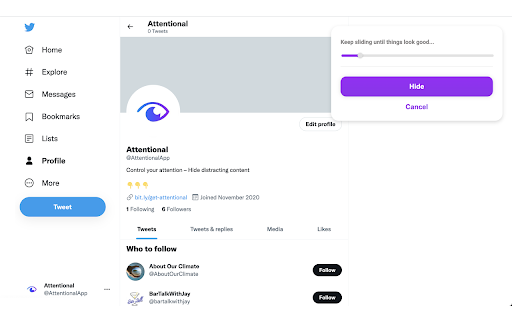

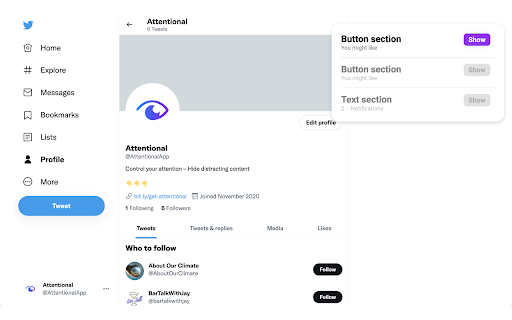
Hide distracting content.
No more unwanted news feeds, notification bubbles or featured sections –
Control your attention by hiding distracting content ?
Simply right-click on a distracting element on any page and select "Hide".
All hidden content will remain hidden until the next time you load the page. To un-hide something, press the app icon and select the element to show.
The code can be found here:
https://github.com/Klingefjord/attentional
If you like this app, consider supporting me in making it even better ?
https://www.buymeacoffee.com/8p8vcb7kgyG
/Oliver
| 分类 | 📝工作流程与规划 |
| 插件标识 | dhgdeehgkaefgjgbaildeljkiplpepon |
| 平台 | Chrome |
| 评分 |
★★★★★
5
|
| 评分人数 | 1 |
| 插件主页 | https://chromewebstore.google.com/detail/attentional-–-hide-distra/dhgdeehgkaefgjgbaildeljkiplpepon |
| 版本号 | 0.0.1.2 |
| 大小 | 637KiB |
| 官网下载次数 | 163 |
| 下载地址 | |
| 更新时间 | 2022-08-02 00:00:00 |
CRX扩展文件安装方法
第1步: 打开Chrome浏览器的扩展程序
第2步:
在地址栏输入: chrome://extensions/
第3步: 开启右上角的【开发者模式】
第4步: 重启Chrome浏览器 (重要操作)
第5步: 重新打开扩展程序管理界面
第6步: 将下载的crx文件直接拖入页面完成安装
注意:请确保使用最新版本的Chrome浏览器
同类插件推荐

QuickPaste
Quickly paste saved text entriesQuickPaste lets us

TinySearch - Advanced Navigator
Extend the browser's built-in search functiona

YT Customizer - YouTube Feed Filter
Seamlessly filter out YT recommendations with Keyw

UncommentEr
Un comments hidden stuff in the htmlFind html comm
TBlock
App block element or class, id, ... in pageGiúp mọ

Hide That
Easily hide unwanted elements on the current page.
Attentional – Hide distracting content
Hide distracting content.No more unwanted news fee

Hide Fixed Elements (packaged by Denis)
Hide fixed elements on a page to open up more view

Hide Anything - Element Hider for Chrome™
Best element hider for Chrome™. Remove distraction

Hide That!
This extension can hide or remove selected element
SocialFocus: Hide Distractions
Block feed, shorts, related and other distractions

History quick view
View, delete and search browsing history dataView,

SEO ToolBox
Transform your Chrome browser into a powerful SEO