
Suspend Tabs at Startup Chrome 插件, crx 扩展下载
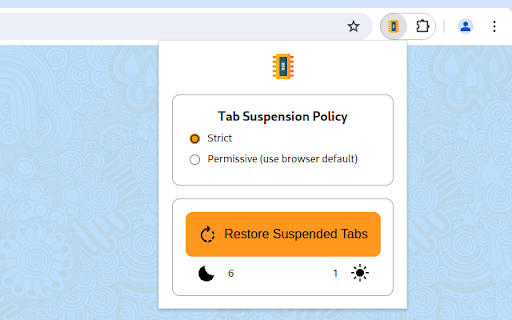
Suspend inactive tabs at startup to free up resources
This extension will automatically invoke the browser's Memory Saver feature to prevent tabs from loading when they are restored, without disrupting your browsing session. If you keep lots of tabs open, this can prevent resource allocation to tabs you will not use. Each tab will load when activated.
Feature: Pinned tabs will be unaffected (but Chrome may decide not to load them).
Limitations: The first tab in the window may also be unaffected.
Going offline? If you need to restore tabs before disconnecting from the internet, click the Restore Suspended Tabs button in the popup.
Stats for nerds: chrome://discards/
Icon attribution:
Ram icons created by Freepik - Flaticon
https://www.flaticon.com/free-icons/ram
Icon direct link: https://www.flaticon.com/free-icon/ram_543238
| 分类 | ⚙️功能性 |
| 插件标识 | dhgmempheoefomjckiihacjicbecjbae |
| 平台 | Chrome |
| 评分 |
★★★☆☆
3.5
|
| 评分人数 | 26 |
| 插件主页 | https://chromewebstore.google.com/detail/suspend-tabs-at-startup/dhgmempheoefomjckiihacjicbecjbae |
| 版本号 | 2024.5.19.1 |
| 大小 | 17.75KiB |
| 官网下载次数 | 524 |
| 下载地址 | |
| 更新时间 | 2024-05-20 00:00:00 |
CRX扩展文件安装方法
第1步: 打开Chrome浏览器的扩展程序
第2步:
在地址栏输入: chrome://extensions/
第3步: 开启右上角的【开发者模式】
第4步: 重启Chrome浏览器 (重要操作)
第5步: 重新打开扩展程序管理界面
第6步: 将下载的crx文件直接拖入页面完成安装
注意:请确保使用最新版本的Chrome浏览器
同类插件推荐
Tab Suspender
Optimize browser performance with Tab Suspender.Ta

Tab Suspender 2.0
Increase browser speed and reduce memory load when

Auto Tab Discard (suspend)
如果您打开了很多标签页,这个扩展能提升浏览器速度并减少内存占用。Auto Tab Discard a
Suspend Tabs at Startup
Suspend inactive tabs at startup to free up resour

Big Chip
Optimize page loading, parallelize computation, al

Memory Saver
Reduce Chrome's memory usage by setting inacti

SleepyTabs
Suspend tabs when not in useSave system resources

Tab Suspender
暫停您不使用的選項卡以節省內存使用量並使您的計算機運行得更快。 減少設備和電池的負載。自動暫停當前未

Tiny Suspender
Unload / suspend / hibernate idle tabs to reduce m

Tab Discard (Suspender)
Easily suspend inactive tabs and save up memory fo

TabXpert - 会话和标签页管理器
下一代会话和标签页管理器标签页管理 轻松将您的标签页组织到标签页组和工作会话中。 TabXpert

Supatabs - 讓OneTab更強大
Supatabs - 讓OneTab更強大!幾秒鐘內整理您的瀏覽器標籤並加速您的電腦。如果你找到了這

Page Load Optimizer
Optimize webpage loading by blocking unnecessary s