
Remove YouTube Shorts Chrome 插件, crx 扩展下载
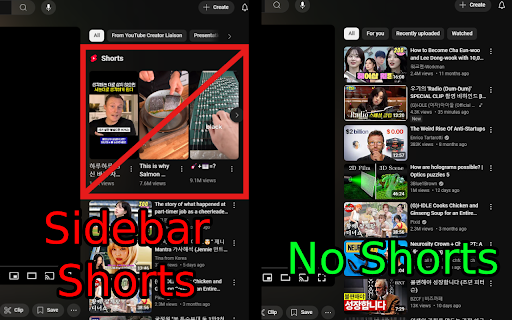
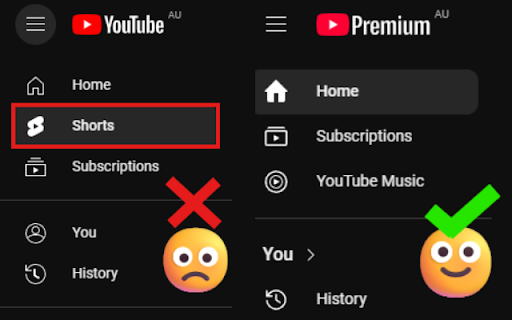
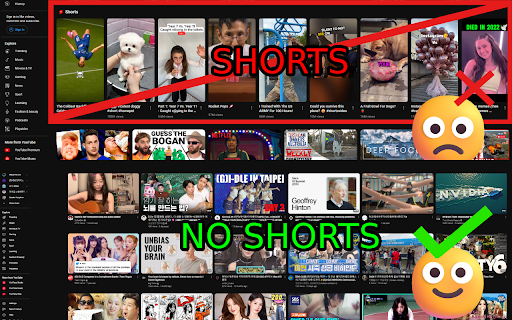
A Chrome extension to remove YouTube Shorts from the homepage and video pages.
Free. Easy-to-use. Toggle switch for quick disabling of all Shorts from Youtube recommendations.
Installation: press the 'Add to Chrome' button.
How to use: It will activate automatically upon installation. To re-enable shorts, or remove the extension, click on the Extensions (on top right corner) > Manage Extensions.
There are other similar extensions on the store; this extension is minimalistic and comes with no other features, which makes it a safer choice from potential security concerns.
Have any questions or feature request? Send email: [email protected]
FAQ:
Q: How do I install the extension?
A: You can install the extension directly from the Chrome Web Store by clicking on the "Add to Chrome" button. Once installed, it will automatically run on any YouTube page you visit, removing Shorts sections as you browse.
Q: Is the extension free?
A: Yes, the extension is completely free to use.
Q: Will the extension block all types of video suggestions?
A: No, the extension only targets YouTube Shorts. All other video suggestions, including long-form videos and recommended content, will still appear as usual on your homepage and sidebar.
Q: Does it work on mobile?
A: Short answer: No. Long answer: Unfortunately, iOS is a highly controlled environment, and it doesn’t allow third-party apps to modify or alter the functionality of other apps. Android is more flexible than iOS, but it still doesn’t officially allow third-party apps to modify or change the behavior of other apps like YouTube. To make modifications at the app level, users would need root access, which, again, isn't recommended for the average user. If you are still interested, look into a mobile browser with an ad/content blocker or alternative clients like NewPipe (for Android).
Q: Does this extension collect my personal data?
A: Absolutely not! This extension does not track or collect any of your personal data. It only modifies the appearance of YouTube pages on your browser to hide Shorts content.
Q: Will this extension work with other browsers like Firefox or Edge?
A: The extension is primarily designed for Google Chrome. However, it may work with Chromium-based browsers like Microsoft Edge and others. To install it in other browsers, you would need to follow their specific instructions for adding Chrome extensions.
Q: Can I re-enable YouTube Shorts after installing the extension?
A: Yes, if you decide that you want to see YouTube Shorts again, you can easily disable or remove the extension from your browser by going to the Extensions page (chrome://extensions/) and turning it off or uninstalling it.
| 分类 | 🛠️工具 |
| 插件标识 | dilmoegnonbiadmhbmaehnhogjlkikdp |
| 平台 | Chrome |
| 评分 |
★★★★☆
4.4
|
| 评分人数 | 57 |
| 插件主页 | https://chromewebstore.google.com/detail/remove-youtube-shorts/dilmoegnonbiadmhbmaehnhogjlkikdp |
| 版本号 | 1.0 |
| 大小 | 4.01KiB |
| 官网下载次数 | 3000 |
| 下载地址 | |
| 更新时间 | 2024-10-23 00:00:00 |
CRX扩展文件安装方法
第1步: 打开Chrome浏览器的扩展程序
第2步:
在地址栏输入: chrome://extensions/
第3步: 开启右上角的【开发者模式】
第4步: 重启Chrome浏览器 (重要操作)
第5步: 重新打开扩展程序管理界面
第6步: 将下载的crx文件直接拖入页面完成安装
注意:请确保使用最新版本的Chrome浏览器
同类插件推荐
Remove YouTube Shorts
A Chrome extension to remove YouTube Shorts from t

Shorts Blocker
Removes Shorts from the home page, subscriptions p
Remove YouTube End Cards & End Screen Videos
Remove YouTube end cards and end screen recommenda

Shorts Remover for YouTube™ Subscriptions
A slim extension that removes YouTube™ Shorts from