
Tab limit Chrome 插件, crx 扩展下载
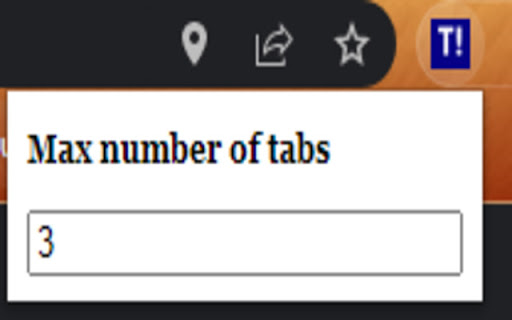
Limit the number of tabs you can have open at a time
The extension allows users to set the maximum number of tabs they want open across their chrome windows at a time. If a user tries to open a tab when he's already at his tab limit, the newly opened tab automatically closes. This extension will be useful to users who find themselves opening more tabs than they need to. It will also helps users get less distracted from the task at hand by finding themselves opening unnecessary tabs. It is kind of a nudge for them to remind themselves that, hey, they need to stay focused on the task at hand. The user can adjust the number of maximum tabs they want open at any point in time.
| 分类 | 📝工作流程与规划 |
| 插件标识 | djdcpjfmniidpdaalloiipgjphgikejl |
| 平台 | Chrome |
| 评分 |
★★★★☆
4.6
|
| 评分人数 | 648 |
| 插件主页 | https://chromewebstore.google.com/detail/tab-limit/djdcpjfmniidpdaalloiipgjphgikejl |
| 版本号 | 0.0.0.1 |
| 大小 | 8.98KiB |
| 官网下载次数 | 3000 |
| 下载地址 | |
| 更新时间 | 2022-05-28 00:00:00 |
CRX扩展文件安装方法
第1步: 打开Chrome浏览器的扩展程序
第2步:
在地址栏输入: chrome://extensions/
第3步: 开启右上角的【开发者模式】
第4步: 重启Chrome浏览器 (重要操作)
第5步: 重新打开扩展程序管理界面
第6步: 将下载的crx文件直接拖入页面完成安装
注意:请确保使用最新版本的Chrome浏览器
同类插件推荐

3 Tabs Only
Allows a maximum of 3 open tabsWork with more focu

Chrome Tab Limiter - 10 Tabs
Mission Labs tab limiter - limits the maximum numb

Chrome Tab Limiter - 5 Tabs
Mission Labs tab limiter - limits the maximum numb

Max Tabs
A small extension to limit the number of open tabs

xTab
Limit the maximum number of tabs that can be open

Tab and Window Limit
Tab and Window Limit, automatically disable the us

Tab Limiter
Limit the number of open tabs – in total and per w
TabLIST - Limits and Block
Limits the number of tabs and block any website in

Tab Limiter And Restorer
Limit the number of tabs opened in a browser windo
Tab limit
Limit the number of tabs you can have open at a ti

Auto-Close New Tabs
Allow only one new tab page at a time.Cases when y

Tab Control
Tab Control stresses over your tabs so you don'

Limit - Set Limits for Distracting Sites
Limit your time spent on distracting sites. Limit