
GPT-Tunnel Chrome 插件, crx 扩展下载
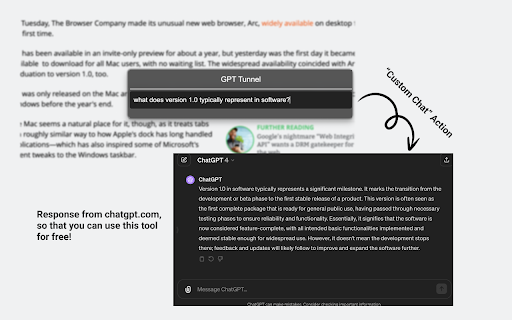
Start a conversation with ChatGPT from a separate webpage, using the local webpage context.
GPT-Tunnel provides a set of simple and powerful actions like explaining selected text on a webpage or asking a question about article. No login, no payment, no separate service. Because it uses ChatGPT under the hood, it's free for ChatGPT users.
Press `Command + Shift + X` to open the command palette in Mac. Or `Win + Shift + X` for windows. You can customize this shortcut via the extension popup.
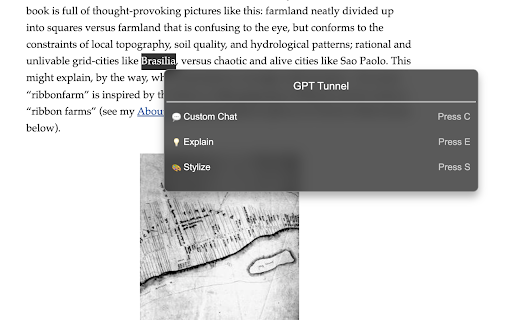
If you select text to focus on, then the available actions are:
- Custom Chat (Press C), then enter a prompt
- Explain (Press E)
- Stylize (Press S), then enter a description of the style you'd like
If you do not select text to focus on, then the available actions are:
- Custom Chat (Press C), then enter a prompt
- Key Points (Press K)
The new chat window opens on the right-half of your screen if you use the chrome browser. This feature doesn't work in Arc.
This extension requests permission to "Read and change all your data on the websites you visit". This is necessary because it has to read the webpage to gather the local context when you trigger an action.
| 分类 | 🛠️工具 |
| 插件标识 | dkelohhjcfbkjkgpmcnboojdonegbakl |
| 平台 | Chrome |
| 评分 |
★★★★☆
4.1
|
| 评分人数 | 697 |
| 插件主页 | https://chromewebstore.google.com/detail/gpt-tunnel/dkelohhjcfbkjkgpmcnboojdonegbakl |
| 版本号 | 1.0.1 |
| 大小 | 1.11MiB |
| 官网下载次数 | 38 |
| 下载地址 | |
| 更新时间 | 2024-03-11 00:00:00 |
CRX扩展文件安装方法
第1步: 打开Chrome浏览器的扩展程序
第2步:
在地址栏输入: chrome://extensions/
第3步: 开启右上角的【开发者模式】
第4步: 重启Chrome浏览器 (重要操作)
第5步: 重新打开扩展程序管理界面
第6步: 将下载的crx文件直接拖入页面完成安装
注意:请确保使用最新版本的Chrome浏览器
同类插件推荐
GPT-Tunnel
Start a conversation with ChatGPT from a separate

谷歌的chatgpt:搜索gpt
将ChatGPT集成到您的搜索引擎中!在任何网站上访问ChatGPT。为任何寻求快速准确信息的人提供

ChatGPT Webpage Summarizer
Summarize web pages using OpenAI's GPT-4 model
Searchable ChatGPT: 搜索 GPT 对话历史
即刻搜索 ChatGPT 对话历史。完全本地化和私密。按侧边栏按钮或快捷键- ? 精确/模糊搜索 C