
Open in IE™ Chrome 插件, crx 扩展下载
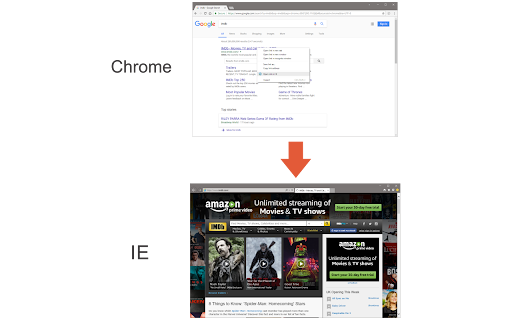
Open links in IE (Internet Explorer)
Open in IE™ addon gives you the ability to open any link in an Internet Explorer page from Chrome.
Note 1: after installing the addon, you need to connect it with native applications (i.e. IE) on your machine. To make this connection, a separate patch is provided in GitHub. Please download and install this patch from: https://github.com/alexmarcoo/open-in-native-client/releases
Follow the instruction on the above GitHub page to download and install the related patch to your system. After installing, the "Open in IE™" addon in your Chrome browser can communicate with IE on your Windows machine.
Note 2: before using the addon, please open the option's page and make sure the path to IE is correct based on your Operating System. For example, the path to IE in Windows 10 is: C:\Program Files\Internet Explorer\iexplore.exe
Next, please follow the below steps to open desired links in IE.
a. Right-click on any link and then click on the Open link in IE (from the context-menu).
b. You can choose to open the window in private (incognito) or normal mode (see the addon's options page).
c. It captures the link from any text content within the page (i.e. for those links that are not hyperlinked).
d. You can set the IE path in your machine from the options page.
Note 3: please note that the Open in IE™ addon, does NOT belong or relate to Internet Explorer, IE, or Microsoft corp at all. It is an unofficial extension that is developed and maintained independently by its author.
To report bugs, please fill out the bug report form on the addon's homepage (https://mybrowseraddon.com/open-in-ie.html).
| 分类 | 🛠️工具 |
| 插件标识 | dkhhkjpckbmkfdicijemmdaieaagkcco |
| 平台 | Chrome |
| 评分 |
★★★☆☆
3.2
|
| 评分人数 | 5 |
| 插件主页 | https://chromewebstore.google.com/detail/open-in-ie/dkhhkjpckbmkfdicijemmdaieaagkcco |
| 版本号 | 0.1.5 |
| 大小 | 32.26KiB |
| 官网下载次数 | 10000 |
| 下载地址 | |
| 更新时间 | 2024-06-09 00:00:00 |
CRX扩展文件安装方法
第1步: 打开Chrome浏览器的扩展程序
第2步:
在地址栏输入: chrome://extensions/
第3步: 开启右上角的【开发者模式】
第4步: 重启Chrome浏览器 (重要操作)
第5步: 重新打开扩展程序管理界面
第6步: 将下载的crx文件直接拖入页面完成安装
注意:请确保使用最新版本的Chrome浏览器
同类插件推荐

IE View WE
Provides ability to open pages and links by Intern

IE View WE MV3
Provides ability to open pages and links by other

IE8 User-Agent
Alternate User-Agent to IE8Simple extension that a

Internet Explorer Countdown Timer
A countdown timer to the fall of the infamous lega

Test IE
Test websites in all versions of real Internet Exp

IEability - Open in IE
在Chrome浏览器中以IE Tab模式运行Internet Explorer (IE),支持旧版网

Open in IE™
Open links in IE (Internet Explorer)Open in IE™ ad

Open IE
Lets you load pages in IE with a single right-clic

IE Tab
Display web pages using IE within Chrome. Use Java

Cloud Browser
Cloud-base Browser for Chromebook,Mac,Linux ! Disp

Open in IE
Send HTML links and webpages directly to the Inter

Open in Microsoft Edge
在Microsoft Edge中轻松打开所需的链接在Microsoft Edge中轻松打开网站链接