
TabStacks: tab and history search Chrome 插件, crx 扩展下载

View and search through open tabs and browser history.
TabStacks is a vertical tab menu that helps you find the content you were looking for. Filter the tabs you have open and TabStacks will list the open tabs that match. If TabStacks can't find an open tab, it searches through your history to see if you had a tab open previously!
TabStacks is designed to be keyboard and screen reader accessible. Press [CTRL]+[SHIFT]+[K] to open the menu, start typing to filter your tabs, and use the [DOWN] arrow key to navigate to the tab you want, and [ENTER] to open that tab. You can always use your mouse as well.
You can search through your history during a tab search by pressing [CTRL+SHIFT+S]. You can close a tab by highlighting it in the list using the arrow keys or right-click and pressing [DELETE] or by clicking the close button on the tab.
TabStacks is a high performance and secure extension for Chrome. TabStacks doesn't download external files, doesn't store any information about your activity.
*** UPDATES ***
Version 2.0.2
* Fixed bug where the popup doesn't close on tab change
* Added a settings item to allow the option to hold the popup open
Version 2.0.1
* The default keyboard shortcut for toggling the search is now CTRL+SHIFT+S due to the browser using nearly all possible combinations of CTRL+ a single key.
* The keyboard shortcut key is now configurable, you can modify it in the settings page. Click the gear icon at upper right of the popup to access settings.
* Minor cosmetic updates to the settings page.
Version 2.0
* Tabs shown in the popup are synchronized with the state of the tabs in the browser:
* Title updates are reflected in real-time.
* New or deleted tabs are reflected in the tab list.
* Close tabs using a button on the tab. Close buttons show on hover or focus.
* Tabs display an audio icon if playing audio.
* For audible tabs, clicking the icon will mute and unmute the tab.
* Settings page has been added, click the gear icon top-right to access settings.
Version 1.1.0
* Updated manifest to v3
Version 1.0.8
* Added lazy loading for site icons to speed up rendering
* Reduced requested browser permissions
Version 1.0.7
* Linux support for launching TabStacks from keyboard with [CTRL+SHIFT+K].
* PopupMenu now has a max-height instead of fixed height.
* Fixed bug on Windows where the scroll bar was rendered even if the tabs would not scroll.
Version 1.0.6
* Improved search algorithm for both tabs and history.
* Searches much longer history time period.
* Tabs in the current window always appear at top when popup is opened (User suggestion).
* URLs for tabs appear on focus or mouseover (User suggestion).
* Engineering improvements under the hood to use Web Components for rendering.
| 分类 | 🛠️工具 |
| 插件标识 | dlnnmaeafoliffblhenabcijmogfefha |
| 平台 | Chrome |
| 评分 |
★★★★☆
4.2
|
| 评分人数 | 10 |
| 插件主页 | https://chromewebstore.google.com/detail/tabstacks-tab-and-history/dlnnmaeafoliffblhenabcijmogfefha |
| 版本号 | 2.0.2 |
| 大小 | 102KiB |
| 官网下载次数 | 1000 |
| 下载地址 | |
| 更新时间 | 2024-05-13 00:00:00 |
CRX扩展文件安装方法
第1步: 打开Chrome浏览器的扩展程序
第2步:
在地址栏输入: chrome://extensions/
第3步: 开启右上角的【开发者模式】
第4步: 重启Chrome浏览器 (重要操作)
第5步: 重新打开扩展程序管理界面
第6步: 将下载的crx文件直接拖入页面完成安装
注意:请确保使用最新版本的Chrome浏览器
同类插件推荐

LayZ - Tab Manager
This extension helps you manage your tabsResearche

OpenedTabs
A simple Tab Manager. List , Copy, Reload, and Clo

Tab Manager
Easily organize all your open tabs in multiple win
Smart Tab Manager
Smart Tab Manager assists users to manage their Ch

TabFern tab manager and backup tool
Save and restore your tabs and windows, and naviga

tabzen
Too many open tabs? Manage your tabs, regain your

Tab List
List opened tabs for current window. Tab groups ar
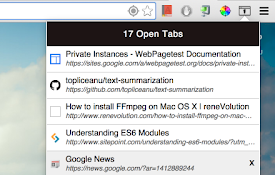
Open Tabs
This extention helps you manage all open tabs on C

TabSpace - The Robust Tab Manager
TabSpace is an easy to use, robust tab manager tha
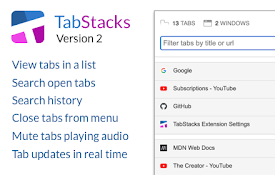
TabStacks: tab and history search
View and search through open tabs and browser hist

ManExt
Manage - and group - your installed extensionsMana

The Great Grouper
Flooded with tabs? Store them easily into groups,
TabMate
TabMate helps you manage the tab clutter. Easily s