
AI Image Detector by IsItAI.com Chrome 插件, crx 扩展下载
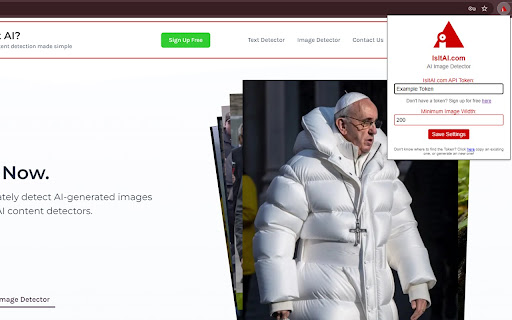
Detects AI images using IsItAI.com's API
Elevate your browsing experience with our AI Detector extension, specifically designed to identify AI-generated images. Utilizing advanced AI detection technology, our tool offers a straightforward solution for spotting images crafted by artificial intelligence directly from your browser.
Is It AI's AI Detector excels in distinguishing AI-generated visuals from those created by humans. The extension seamlessly integrates into your daily web navigation, allowing for instant analysis of any image with a simple right-click or through direct upload on our dashboard.
Our finely-tuned AI detection system captures the intricate details that set AI creations apart from organic artwork. By focusing on AI-generated image identification, Is It AI delivers accurate and reliable results, ensuring users can trust the authenticity of the visuals they encounter online.
To keep pace with the rapid advancements in AI image generation, Is It AI continuously updates its detection model, providing users with a cutting-edge tool for AI detection.
Getting started with Is It AI's AI Detector is easy:
Click "Add to Chrome" on this page to install the Is It AI extension.
Pin it to your Chrome toolbar for quick access.
Analyze an image by clicking directly on the button that appears or by right-clicking on any image and selecting "Is It AI?".
Receive your analysis instantly, indicating whether the image has been generated by AI.
Is It AI's AI Detector is your dedicated tool for navigating the digital world with confidence, ensuring the authenticity of the images you view online.
Visit us at IsItAI.com for more information and updates.
| 分类 | 🛠️工具 |
| 插件标识 | dmabdcmpcggmdaebhjdceabpjifdpaop |
| 平台 | Chrome |
| 评分 |
★★★★☆
4.1
|
| 评分人数 | 38 |
| 插件主页 | https://chromewebstore.google.com/detail/ai-image-detector-by-isit/dmabdcmpcggmdaebhjdceabpjifdpaop |
| 版本号 | 0.0.4 |
| 大小 | 23.71KiB |
| 官网下载次数 | 53 |
| 下载地址 | |
| 更新时间 | 2024-06-18 00:00:00 |
CRX扩展文件安装方法
第1步: 打开Chrome浏览器的扩展程序
第2步:
在地址栏输入: chrome://extensions/
第3步: 开启右上角的【开发者模式】
第4步: 重启Chrome浏览器 (重要操作)
第5步: 重新打开扩展程序管理界面
第6步: 将下载的crx文件直接拖入页面完成安装
注意:请确保使用最新版本的Chrome浏览器
同类插件推荐
AI Image Detector by IsItAI.com
Detects AI images using IsItAI.com's APIElevat
Picture-in-Picture Viewer
Watch video using the Picture-in-Picture API.A sim

AI数学求解器
AI数学求解器:使用AI来解决数学测试,获得逐步解决方案,并使用Math AI通过图片解决问题。✨
AI Detector - BitMind
? Identify Fake AI Media with Ease!Say goodbye to