
SEO Website Scanner: Meta Info, Headings, Word Count, etc. Chrome 插件, crx 扩展下载
Scans a site for basic SEO meta information and headings
Boost Your SEO Performance Effortlessly
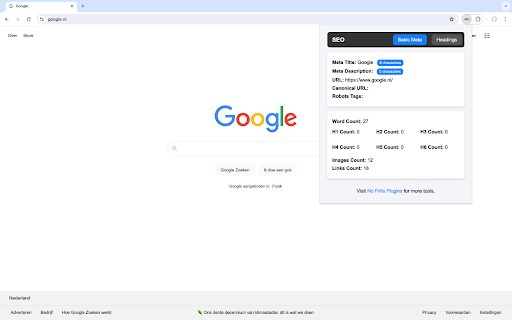
SEO Website Scanner is your all-in-one tool for quick and comprehensive website analysis. Designed specifically for SEO enthusiasts, digital marketers, and content creators, this extension provides essential insights to enhance your website's SEO performance right from your browser.
KEY FEATURES:
1. Meta Information at a Glance:
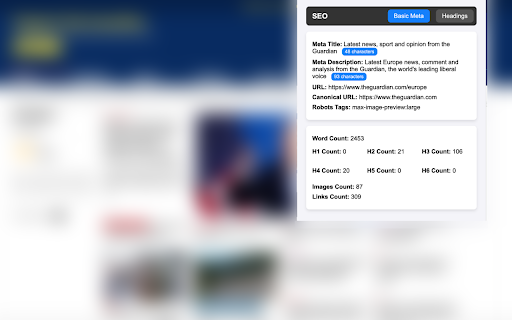
- Meta Title: View and analyze your page’s title along with character count.
- Meta Description: Check your meta description with an instant character count.
- URL: Easily access and verify your page’s URL.
- Canonical URL: Ensure your canonical URL is set correctly.
- Robots Tags: Check your robots meta tags for better indexing control.
2. Content Analysis:
- Word Count: Quickly see the total word count of your page’s content.
- Heading Tags Overview: Get a detailed count of all heading tags (H1 to H6) on your page.
3. Detailed Headings Structure:
- Hierarchical View: Understand the structure and hierarchy of your heading tags to improve content organization and SEO.
4. Media Insights:
- Images Count: Know the number of images on your page for better media optimization.
- Links Count: Get the total number of links to improve internal linking strategies.
WHY CHOOSE SEO Website Scanner?
- User-Friendly Interface: Clean and intuitive design makes it easy for anyone to use, regardless of technical skill.
- Instant Results: Get all the SEO data you need with a single click.
- Improve Your SEO Strategy: Use detailed insights to refine your content, improve your website’s structure, and boost your search engine rankings.
HOW TO USE:
1. Install the Extension: Add SEO Website Scanner to your Chrome browser.
2. Navigate to Any Web Page: Go to the page you want to analyze.
3. Click the SEO Website Scanner Icon: Get instant access to detailed SEO insights.
4. Switch Between Tabs: Use the tab buttons to view basic meta information or a detailed headings structure.
Visit Us:
For more tools and SEO resources, visit No Frills Plugins
Enhance your SEO efforts with SEO Website Scanner – the simplest way to get the SEO data you need, right when you need it. Install now and take your website’s performance to the next level!
| 分类 | 🛠️工具 |
| 插件标识 | dnjdkfepeapfepdjicijjkfglhogpapd |
| 平台 | Chrome |
| 评分 |
★★★★★
5
|
| 评分人数 | 6 |
| 插件主页 | https://chromewebstore.google.com/detail/seo-website-scanner-meta/dnjdkfepeapfepdjicijjkfglhogpapd |
| 版本号 | 1.0.3 |
| 大小 | 50.08KiB |
| 官网下载次数 | 371 |
| 下载地址 | |
| 更新时间 | 2024-07-26 00:00:00 |
CRX扩展文件安装方法
第1步: 打开Chrome浏览器的扩展程序
第2步:
在地址栏输入: chrome://extensions/
第3步: 开启右上角的【开发者模式】
第4步: 重启Chrome浏览器 (重要操作)
第5步: 重新打开扩展程序管理界面
第6步: 将下载的crx文件直接拖入页面完成安装
注意:请确保使用最新版本的Chrome浏览器
同类插件推荐

Highlight HTML Headings
Vixen Digital tool to highlight HTML headings in a

Meta SEO Viewer - SuperIntent.IO
Your all in one tool for detailed SEO Meta analysi
SEO | ASO | Search Ranking & Keyword Tool
SEO & ASO optimization tool. Complete on page

SEO Website Scanner: Meta Info, Headings, Word Count, etc.
Scans a site for basic SEO meta information and he

Orca SEO - Your All-in-One SEO Extension
Optimize your website with Orca SEO. Analyze SEO,
SEO Lens | A free tool for On-page seo
One stop solution for on-page SEO reports. Get you

SEO On-Page Analyzer
Chrome extension to review the on-page SEO attribu
SEO Buddy - On-Page SEO Analyser
A complete On-Page SEO tool to help you analyse yo

「ROSSK SEO 扩展:免费 SEO 检查工具、链接分析器
「只需点击一下,即可获取任何网站的 SEO 洞察。由拥有 15 年经验的 SEO 专家打造。」最简单

My IP Address Checker: Test IP + IPv6 + VPN
Displays IP address info and details like location

SEO Pilot
SEO Pilot helps you in your daily SEO tasks such a

SEO Analyzer: One-Click Website Audit
Quickly access your website's SEO metrics. Ana
SEO ToolBox
Transform your Chrome browser into a powerful SEO