
Reaction Free Extension Chrome 插件, crx 扩展下载
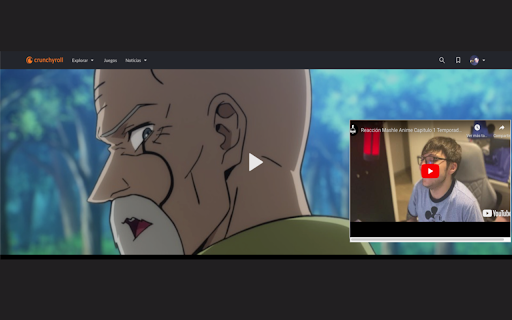

Add a youtube video reaction to your Streaming service video player
Elevate your anime viewing experience with Free Reactions! Seamlessly watch YouTube video reactions alongside your favorite anime episodes on Crunchyroll. This allow to youtubers to upload just the reaction avoiding trying to upload a part of the original anime with modifications to get in "fair use void"
With Free Reactions, you can enjoy the thrill of watching anime reactions while simultaneously viewing the corresponding scenes in the Crunchyroll player. Simply log in with your paid Crunchyroll account, and start exploring a whole new dimension of anime entertainment.
Features:
Watch YouTube video reactions side-by-side with Crunchyroll anime episodes.
Enhance your understanding and enjoyment of anime scenes with real-time reactions.
Streamline your viewing experience by accessing both platforms within the same window.
Seamless integration with your Crunchyroll account for effortless setup and usage.
Note: A paid Crunchyroll and youtube premium account is required to unlock the full functionality of Free Reactions.
Level up your anime-watching game and immerse yourself in the vibrant community of anime fans with Free Reactions. Get ready to experience anime like never before!
If you are content creator, check our website create reactions links for our extension: https://www.reaction-free.com/
? How it works?
1- Record and upload your reaction video to YouTube.
2- Fill out our link creation form, providing the YouTube link to your reaction video, the link to the copyrighted content on Crunchyroll that you reacted to, and the timestamp when your video's intro ends and the show begins.
3- Share the generated link in your YouTube video description, allowing your subscribers to seamlessly watch the show and your reaction together instantly.
(Remember to explain to your subscriber in your video intro and share the extension link too)
Feel free to let me know if you need any further adjustments or have any other requests!
| 分类 | ⚙️功能性 |
| 插件标识 | dnjfoljmledpdphbilpfcpmgjmcnbiic |
| 平台 | Chrome |
| 评分 |
★★★★☆
4.3
|
| 评分人数 | 48 |
| 插件主页 | https://chromewebstore.google.com/detail/reaction-free-extension/dnjfoljmledpdphbilpfcpmgjmcnbiic |
| 版本号 | 0.1 |
| 大小 | 88.51KiB |
| 官网下载次数 | 12 |
| 下载地址 | |
| 更新时间 | 2024-02-27 00:00:00 |
CRX扩展文件安装方法
第1步: 打开Chrome浏览器的扩展程序
第2步:
在地址栏输入: chrome://extensions/
第3步: 开启右上角的【开发者模式】
第4步: 重启Chrome浏览器 (重要操作)
第5步: 重新打开扩展程序管理界面
第6步: 将下载的crx文件直接拖入页面完成安装
注意:请确保使用最新版本的Chrome浏览器
同类插件推荐

YouTube Streams +
Adds a livestream preview to the YouTube channel l
Reaction Free Extension
Add a youtube video reaction to your Streaming ser

YouTube Rewind & Fast Forward Buttons
Add Rewind & Fast Forward buttons to videos pl

Youtube Accelerator
Set custom playback speeds on your Youtube videosS