
Convert PDF to Editable Doc Chrome 插件, crx 扩展下载
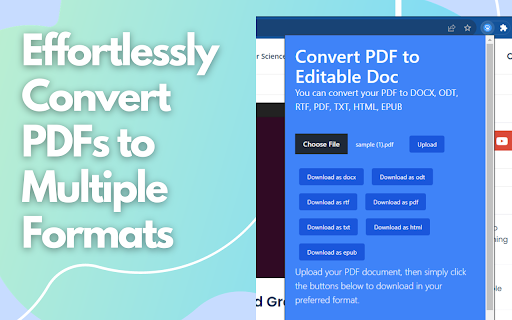
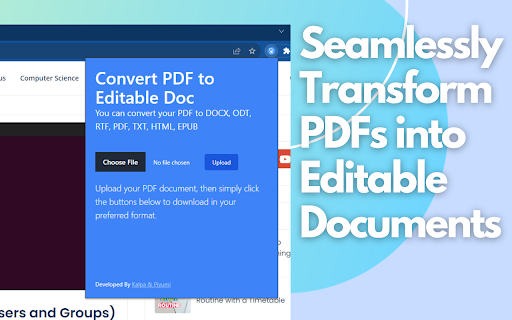
Effortlessly convert your PDF to DOCX, ODT, RTF, PDF, TXT, HTML, EPUB with Convert PDF to Editable Doc.
Introducing our Chrome extension, the ultimate PDF transformation tool! , "Convert PDF to Editable DOC," you can seamlessly convert any PDF document into a versatile range of editable formats, making it the perfect solution for tackling scanned or uneditable PDFs.
Whether you're dealing with scanned documents from your exams or facing the challenge of uneditable PDFs in your work, our extension has you covered. You can effortlessly convert PDFs to DOCX, ODT, RTF, PDF, TXT, HTML, and EPUB formats, giving you the freedom to edit, search, and interact with your documents like never before.
The motivation behind creating this extension is simple: to enhance productivity and convenience for students, professionals, and anyone who regularly works with documents. As a student myself, I often encountered exam practice papers in uneditable or scanned formats. With this extension, I found a solution to convert them into editable documents, enabling me to easily extract questions for practice or conduct research through chat with GPT or quick Google searches. This extension aims to be a valuable asset for students and document-centric professionals alike, streamlining the document-handling process and facilitating efficient work and study practices.
| 分类 | 🛠️工具 |
| 插件标识 | dohkohlaloioojcbkhpngncfaolcimio |
| 平台 | Chrome |
| 评分 |
★★★★☆
4.6
|
| 评分人数 | 2978 |
| 插件主页 | https://chromewebstore.google.com/detail/convert-pdf-to-editable-d/dohkohlaloioojcbkhpngncfaolcimio |
| 版本号 | 0.0.0.2 |
| 大小 | 81.14KiB |
| 官网下载次数 | 809 |
| 下载地址 | |
| 更新时间 | 2023-09-30 00:00:00 |
CRX扩展文件安装方法
第1步: 打开Chrome浏览器的扩展程序
第2步:
在地址栏输入: chrome://extensions/
第3步: 开启右上角的【开发者模式】
第4步: 重启Chrome浏览器 (重要操作)
第5步: 重新打开扩展程序管理界面
第6步: 将下载的crx文件直接拖入页面完成安装
注意:请确保使用最新版本的Chrome浏览器
同类插件推荐
Convert PDF to Editable Doc
Effortlessly convert your PDF to DOCX, ODT, RTF, P

PDF to PPT | PDF转PPT
轻松将PDF转换为PPT!使用我们的PPT转PDF转换器,快速可靠地转换文件。完美适用于演示文稿。?

在线 PDF 转换器
支持 PDF、Word、Excel、PPT、JPG 的转换工具。只需一次点击,即可将 PDF 转换为

PDF Translator - 在线翻译 PDF
只需一键翻译 PDF、Excel、Word、PowerPoint 和其他文档。适用于办公和教育场景中